

{% note warning %}
吐槽
话在前头:这是我们队第二次打线下赛,第一次是鹏城杯决赛,但是因为考虑到保密问题所以我没写复盘
喜欢我队友下载取证 5 个 G 的附件 20KB/s 剩余时间 3 天嘛?还是说,喜欢的是我根本就进不去比赛平台 ♪
笑死了,华南赛区这边刚开始根本就进不去平台,好不容易我们队四个有一个队友进去了,结果自己的账号密码忘记了先用的我的,后面说可以重置账号密码,上报后说重置完了(为统一的一个强密码),结果还是登不进去,这不是重置了个寂寞吗……最后一个队四个人三个人用我的号,剩下一个队友用自己的
还有还有,怎么有赛事主办方提供的附件(babymooer 的附件)对系统有要求啊(据说是 Win 10 22H2 测试通过),导致我们没有任何一个人能打开这个附件(附加调试器打开就蓝屏了)
还有还有还有,从早上八点半打到下午三点半,连饭都没得吃,饿死啦!!!(哭~~~~~~
{% endnote %}
比赛题目
这次比赛共有 8 道题目,其中有 3 道 Web 题,一道 re 题,剩下的都是 MISC 题
题目列表在这里
| 题目名称 | 题目分类 | 题目描述 | 题目备注 |
|---|---|---|---|
| babymooer | Reverse (驱动) | 请在Windows 10低版本运行该程序,否则会闪退,在Windows 10 22H2测试通过。 注意: 1.请上交题目解题报告,否则题目成绩可能被判定无效。 2.提交答案时只需提交{}中的字符串。 3.请关注赛事公告,访问方法:左侧菜单栏“赛事大厅”>所报名赛事的“详情”>下拉页面“赛事公告” babymaooer解题提示:kdmapper;内存读写。 babymaooer解题提示:一个exe两个程序。 | 关于驱动加载,且限制了系统的版本,导致附加调试器后我们队 re 手电脑蓝屏 |
| justdeserialize | Web (反序列化) | ||
| ez_sight | MISC (AI) | 公司给大家发公告了… | 关于 AI 视觉模型的应用以及压缩包明文爆破 |
| razorcor | Web | maybe this one is interesting… | |
| sharkmarket | MISC (Web3/Rust) | sharkmarket解题提示:也许需要获得足够的 coin。 | 用 Rust 写的合约后端 |
| encoder | PWN (Buffer) | encoder题目说明:请连接socks5代理后,访问题目地址192.0.100.2:8888。socks5代理的连接信息请参考靶机中的socks5端口、用户、密码。 | |
| 5G消息_TLS | MISC (Traffic) | Bob窃取到一个文件,并通过5G消息的形式告诉了Alice,不料他们的通信被窃听了,拿到这个文件,努力去获取最终的答案吧 | 通过 SIP 协议明文发送的 TLS 密钥以及 HTTPS 数据流的解密 |
| DC-Forensics | MISC (Forensics) | - 小梁的域控机器被黑客攻击了,请你找出一些蛛丝马迹。 攻击者通过AD CS提权至域管理员,在攻击过程中,攻击者使用有问题的证书模版注册了一张证书,该证书的证书模版名、证书序列号是什么?(格式为模版名-序列号,如CertTemplate-2f000000064287f6f5d6ff4a91000000000006) - 小梁的域控机器被黑客攻击了,请你找出一些蛛丝马迹。 攻击者在获取域管理员权限后,尝试上传木马文件,但是被杀毒软件查杀,上传的木马文件的绝对路径是什么?(如C:\Windows\cmd.exe) - 小梁的域控机器被黑客攻击了,请你找出一些蛛丝马迹。 攻击者从机器中提取出了用户的连接其他机器的Windows企业凭据,凭据的连接IP、用户名、密码是什么?(格式为IP-用户名-密码,如127.0.0.1-sam-123456) - 小梁的域控机器被黑客攻击了,请你找出一些蛛丝马迹。 攻击者创建了一个新用户组和一个新用户,并把这个用户加入了新用户组和域管理员组中,新用户组名、新用户的用户名、新用户的密码是什么?(用户组名和用户名均小写,格式为用户组名-用户名-密码 ,如admins-sam-123456) | AD 域中的子设备应急处理 |
比赛复盘
这次的复盘,我想先从做出来的题目开始。我们队总共做出来两道题,分别是 5G消息_TLS 和 DC-Forensics-2
[MISC] 5G消息_TLS
Bob窃取到一个文件,并通过5G消息的形式告诉了Alice,不料他们的通信被窃听了,拿到这个文件,努力去获取最终的答案吧
题目提供了一个流量包,从中可以看到可以发现 SIP 流(消息发送的流)
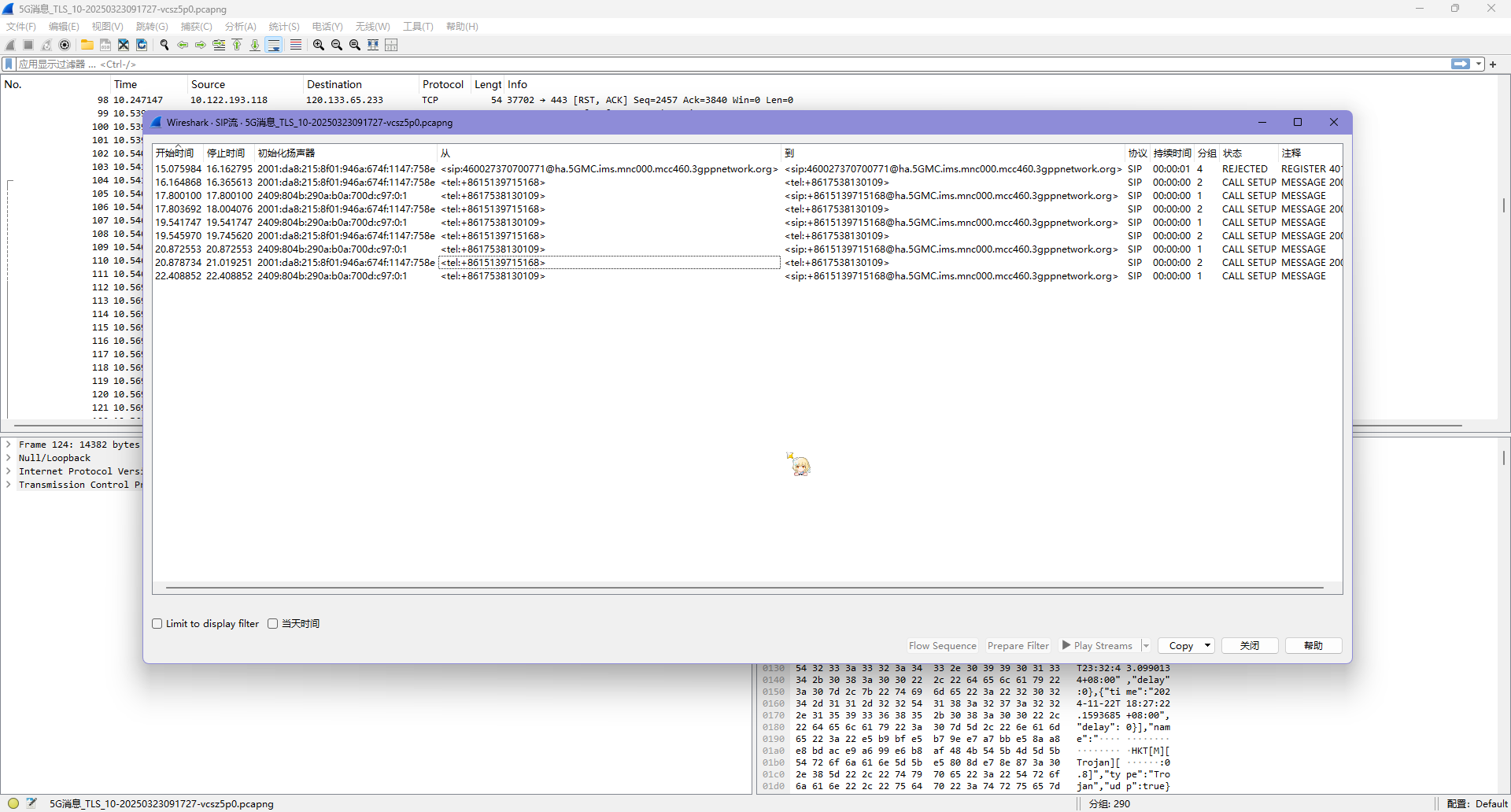
查询每个 SIP 流,可以得到所有的 TLS 密钥如下
SERVER_TRAFFIC_SECRET_0 9745a631db0b9b715f18a55220e17c88fdf3389c0ee899cfcc45faa8696462c1 1fbf7c07ca88c7c91be9cce4c9051f2f4bd7fb9714920661d026119ebab458db8637089348dd5a92dc75633bdcf43630CLIENT_HANDSHAKE_TRAFFIC_SECRET 9745a631db0b9b715f18a55220e17c88fdf3389c0ee899cfcc45faa8696462c1 a98fab3039737579a50e2b3d0bbaba7c9fcf6881d26ccf15890b06d723ba605f096dbe448cd9dcc6cf4ef5c82d187bd0SERVER_HANDSHAKE_TRAFFIC_SECRET 9745a631db0b9b715f18a55220e17c88fdf3389c0ee899cfcc45faa8696462c1 994da7436ac3193aff9c2ebaa3c072ea2c5b704683928e9f6e24d183e7e530386c1dcd186b9286f98249b4dc90d8b795EXPORTER_SECRET 9745a631db0b9b715f18a55220e17c88fdf3389c0ee899cfcc45faa8696462c1 31882156a3212a425590ce171cb78068ee63e7358b587fed472d45d67ea567d98a079c84867a18665732cf0bfe18f0b0CLIENT_TRAFFIC_SECRET_0 9745a631db0b9b715f18a55220e17c88fdf3389c0ee899cfcc45faa8696462c1 646306cb35d94f23e125225dc3d3c727df65b6fcec4c6cd77b6f8e2ff36d48e2b7e92e8f9188597c961866b3b667f405{% note info %}
这里的解密过程参考了 @Lunatic 的 Misc-Network Traffic Analysis
- https://goodlunatic.github.io/posts/5422d65/ 上述的文章地址
- https://github.com/goodlunatic/goodlunatic.github.io 大佬的 Github 静态网站仓库
刚好我们在赛前看到了这个大佬的 MISC Guide,认为他的经验能够帮助我们在比赛中完成题目,遂将他的 Blog 从 Github 下载了下来,使用 Python 的 http.server 本地浏览,没想到真的能够派上用场
在这里真的很感谢这位大佬,能够公开自己的静态网站的仓库,最后能被我们派上用场
{% endnote %}
把这个密钥丢到 wireshark 的 TLS 设置里面
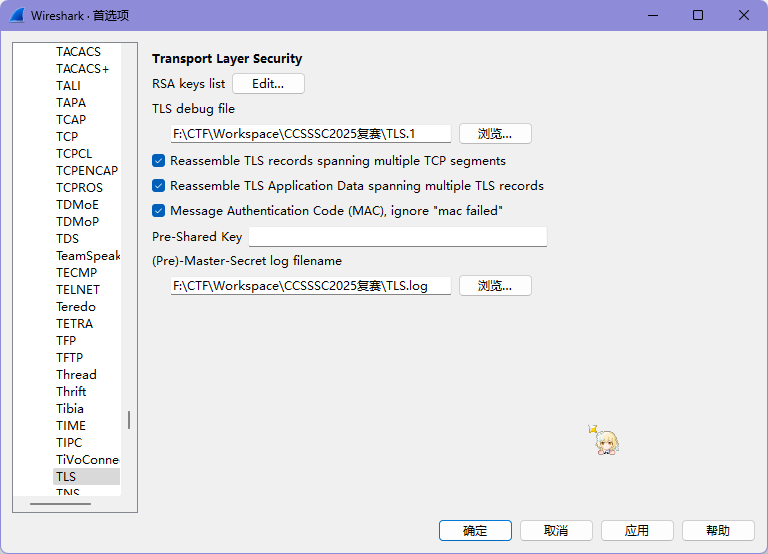
为了确定是否正确,我上面是指定了一个 Debug File 的,打开这个文件,可以看到里面的提示
dissect_ssl enter frame #27 (first time)packet_from_server: is from server - TRUE conversation = 0000026E74E34DA0, ssl_session = 0000026E74E358F0 record: offset = 0, reported_length_remaining = 1386ssl_try_set_version found version 0x0303 -> state 0x91dissect_ssl3_record: content_type 22 Handshakedecrypt_ssl3_record: app_data len 69, ssl state 0x91packet_from_server: is from server - TRUEdecrypt_ssl3_record: using server decoderdecrypt_ssl3_record: no decoder availabledissect_ssl3_handshake iteration 1 type 2 offset 5 length 65 bytesssl_try_set_version found version 0x0303 -> state 0x91Calculating hash with offset 5 69ssl_dissect_hnd_hello_common found SERVER RANDOM -> state 0x93ssl_set_cipher found CIPHER 0xC030 TLS_ECDHE_RSA_WITH_AES_256_GCM_SHA384 -> state 0x97trying to use TLS keylog in F:\CTF\Workspace\CCSSSC2025复赛\TLS.log checking keylog line: SERVER_TRAFFIC_SECRET_0 9745a631db0b9b715f18a55220e17c88fdf3389c0ee899cfcc45faa8696462c1 1fbf7c07ca88c7c91be9cce4c9051f2f4bd7fb9714920661d026119ebab458db8637089348dd5a92dc75633bdcf43630 matched server_appdata checking keylog line: CLIENT_HANDSHAKE_TRAFFIC_SECRET 9745a631db0b9b715f18a55220e17c88fdf3389c0ee899cfcc45faa8696462c1 a98fab3039737579a50e2b3d0bbaba7c9fcf6881d26ccf15890b06d723ba605f096dbe448cd9dcc6cf4ef5c82d187bd0 matched client_handshake checking keylog line: SERVER_HANDSHAKE_TRAFFIC_SECRET 9745a631db0b9b715f18a55220e17c88fdf3389c0ee899cfcc45faa8696462c1 994da7436ac3193aff9c2ebaa3c072ea2c5b704683928e9f6e24d183e7e530386c1dcd186b9286f98249b4dc90d8b795 matched server_handshake checking keylog line: EXPORTER_SECRET 9745a631db0b9b715f18a55220e17c88fdf3389c0ee899cfcc45faa8696462c1 31882156a3212a425590ce171cb78068ee63e7358b587fed472d45d67ea567d98a079c84867a18665732cf0bfe18f0b0 matched exporter checking keylog line: CLIENT_TRAFFIC_SECRET_0 9745a631db0b9b715f18a55220e17c88fdf3389c0ee899cfcc45faa8696462c1 646306cb35d94f23e125225dc3d3c727df65b6fcec4c6cd77b6f8e2ff36d48e2b7e92e8f9188597c961866b3b667f405 matched client_appdatatls13_load_secret TLS version 0x303 is not 1.3tls13_load_secret TLS version 0x303 is not 1.3 record: offset = 74, reported_length_remaining = 1312 need_desegmentation: offset = 74, reported_length_remaining = 1312里面写了 matched 说明我们找对了,过滤 HTTP 协议,可以看见一张图片
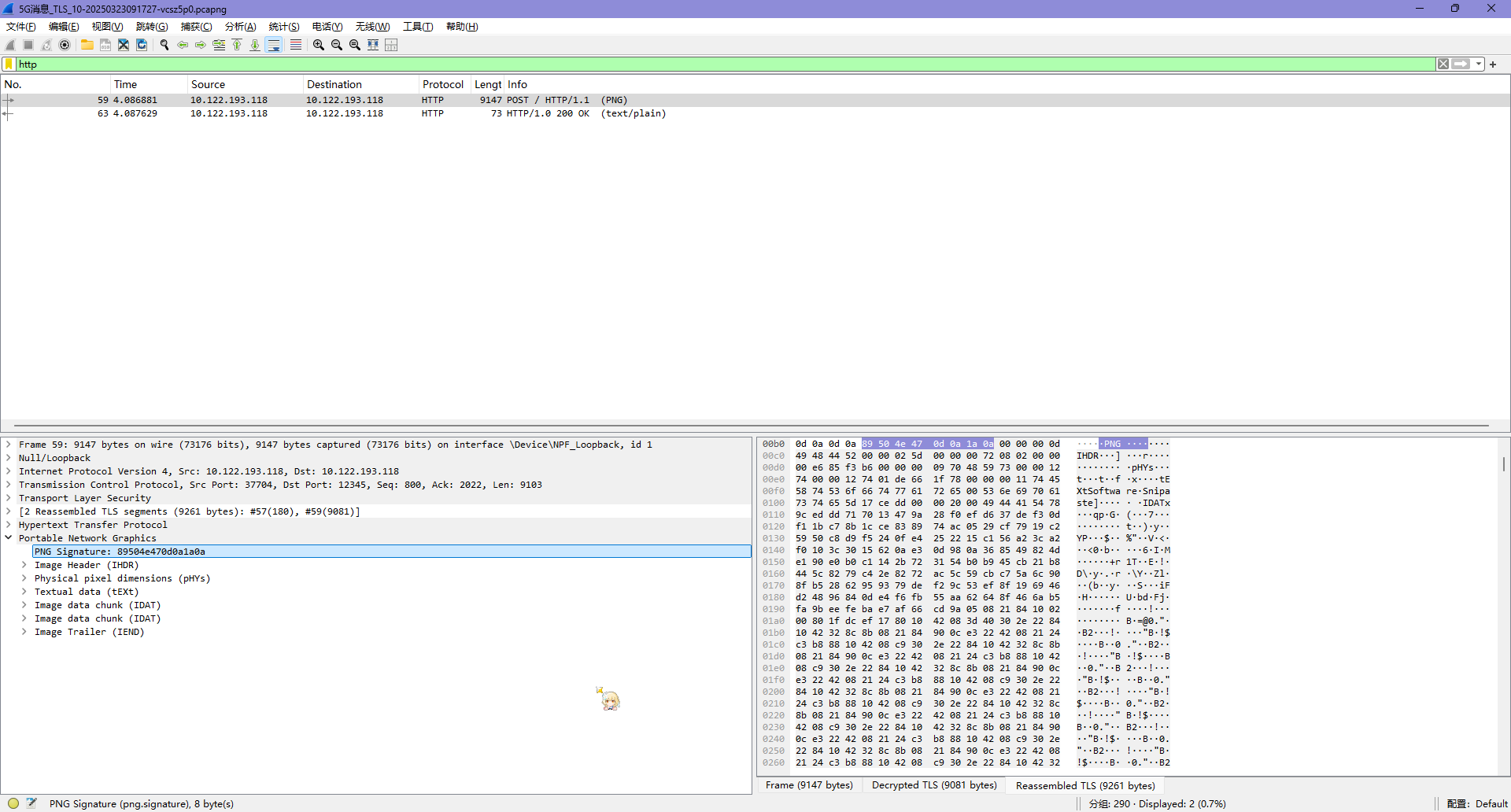
把图片的数据流拿出来,丢进赛博厨子就能看到 flag 了
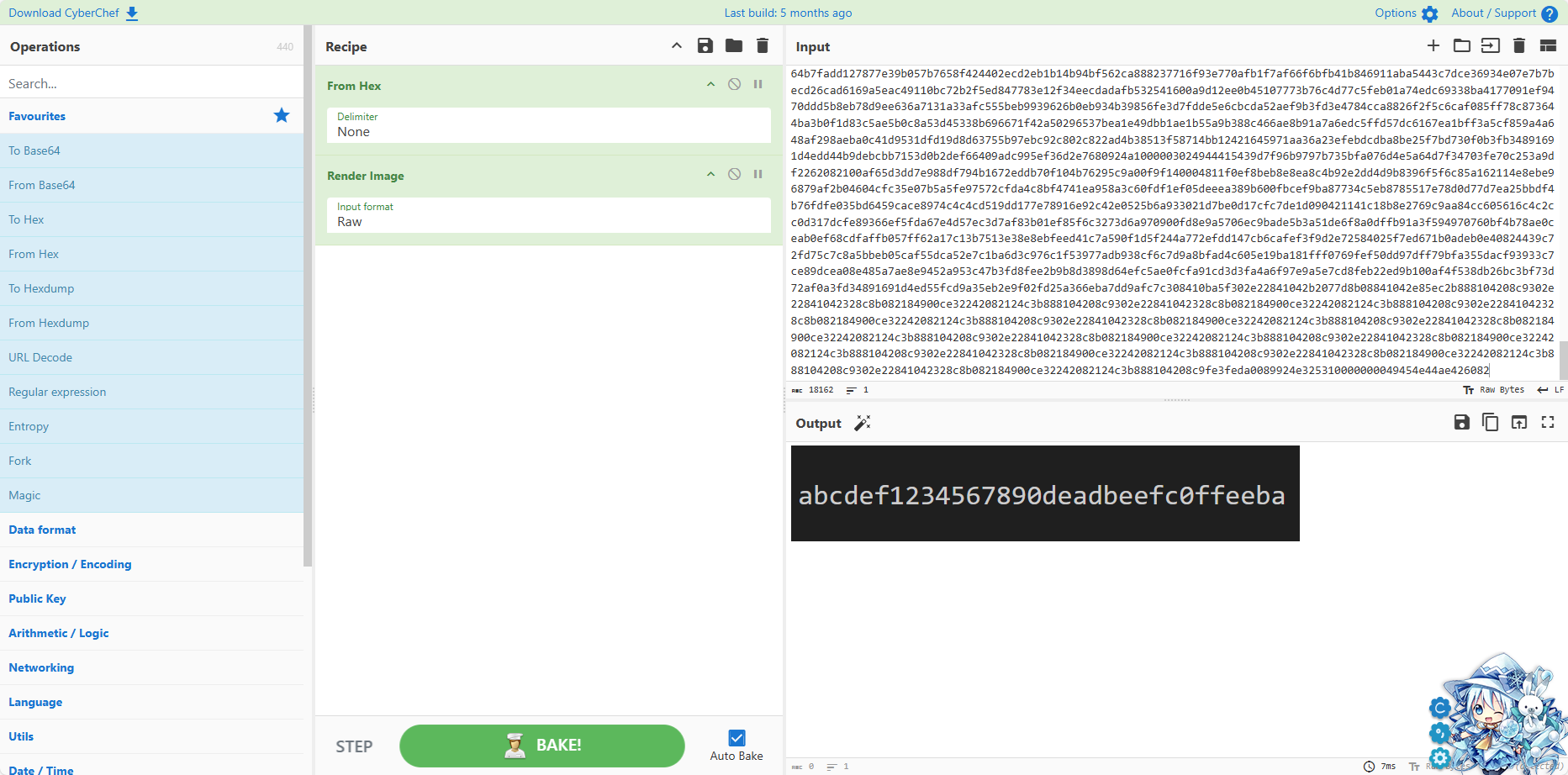
得到 flag 为 abcdef1234567890deadbeefc0ffeeba
附:使用电脑的时候导出 SSLKEY
{% note warning %}
需要使用 Google Chrome!!!Edge不行!!!
{% endnote %}
在环境变量中添加名为 SSLKEYLOGFILE 的变量即可,内容为你需要保存的文件路径
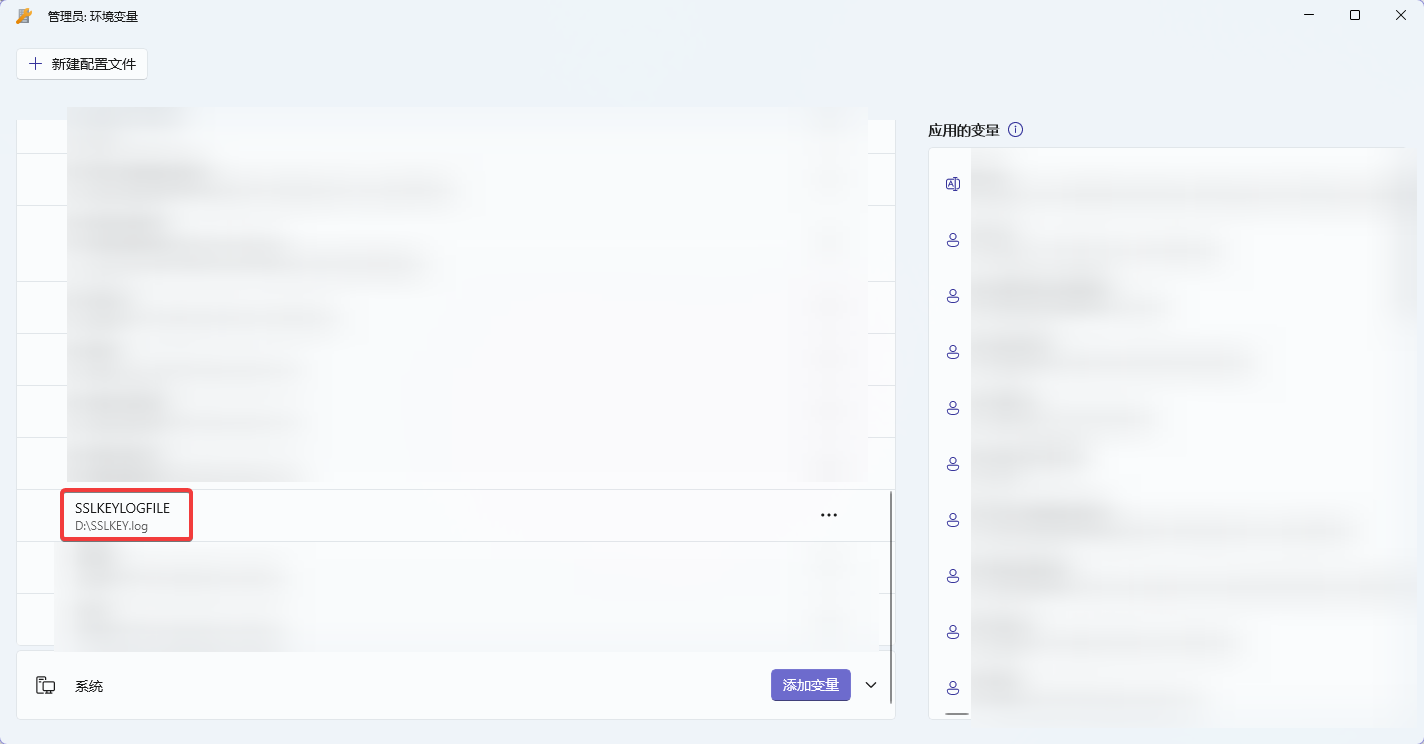
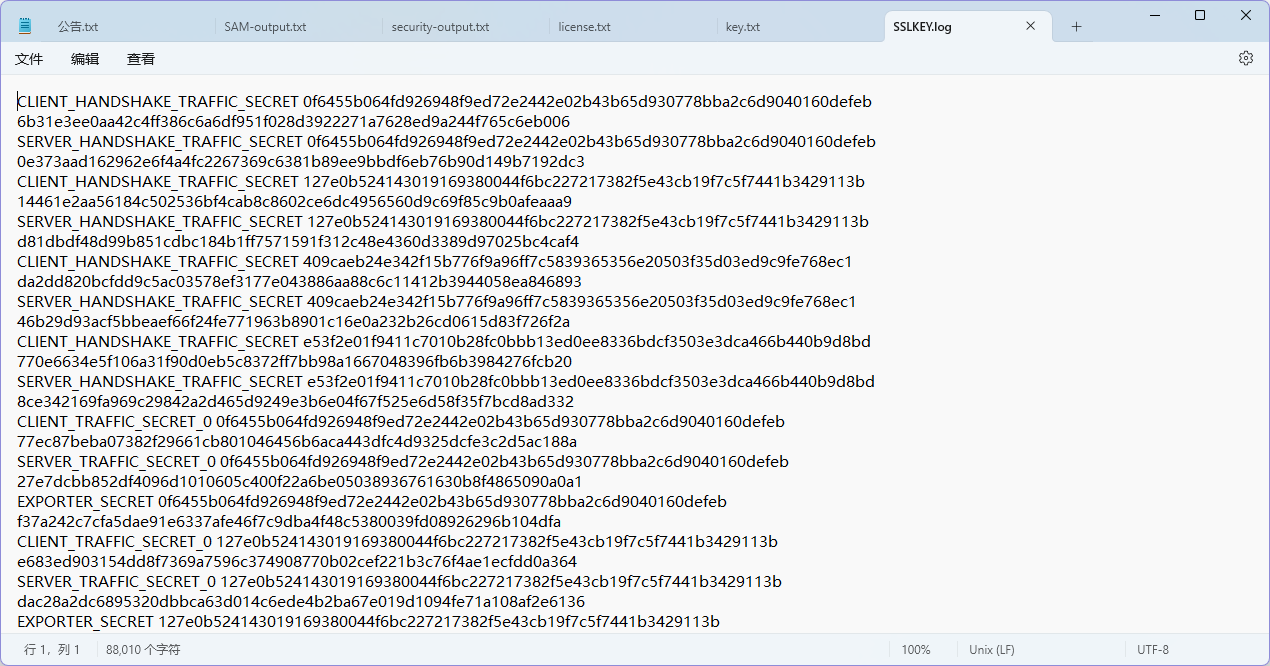
然后直接打开 Google Chrome 访问网站,在你指定的文件里面就会出现 SSLKEY 了
[MISC | Forensics] DC-Forensics-2
小梁的域控机器被黑客攻击了,请你找出一些蛛丝马迹。 攻击者在获取域管理员权限后,尝试上传木马文件,但是被杀毒软件查杀,上传的木马文件的绝对路径是什么?(如C:\Windows\cmd.exe)
这整个系列的题目,我们队的入手点都是这台 Windows 电脑的事件管理器保存下来的事件文件,我们从 C:\Windows\System32\winevt 可以看到 Windows 电脑的事件文件
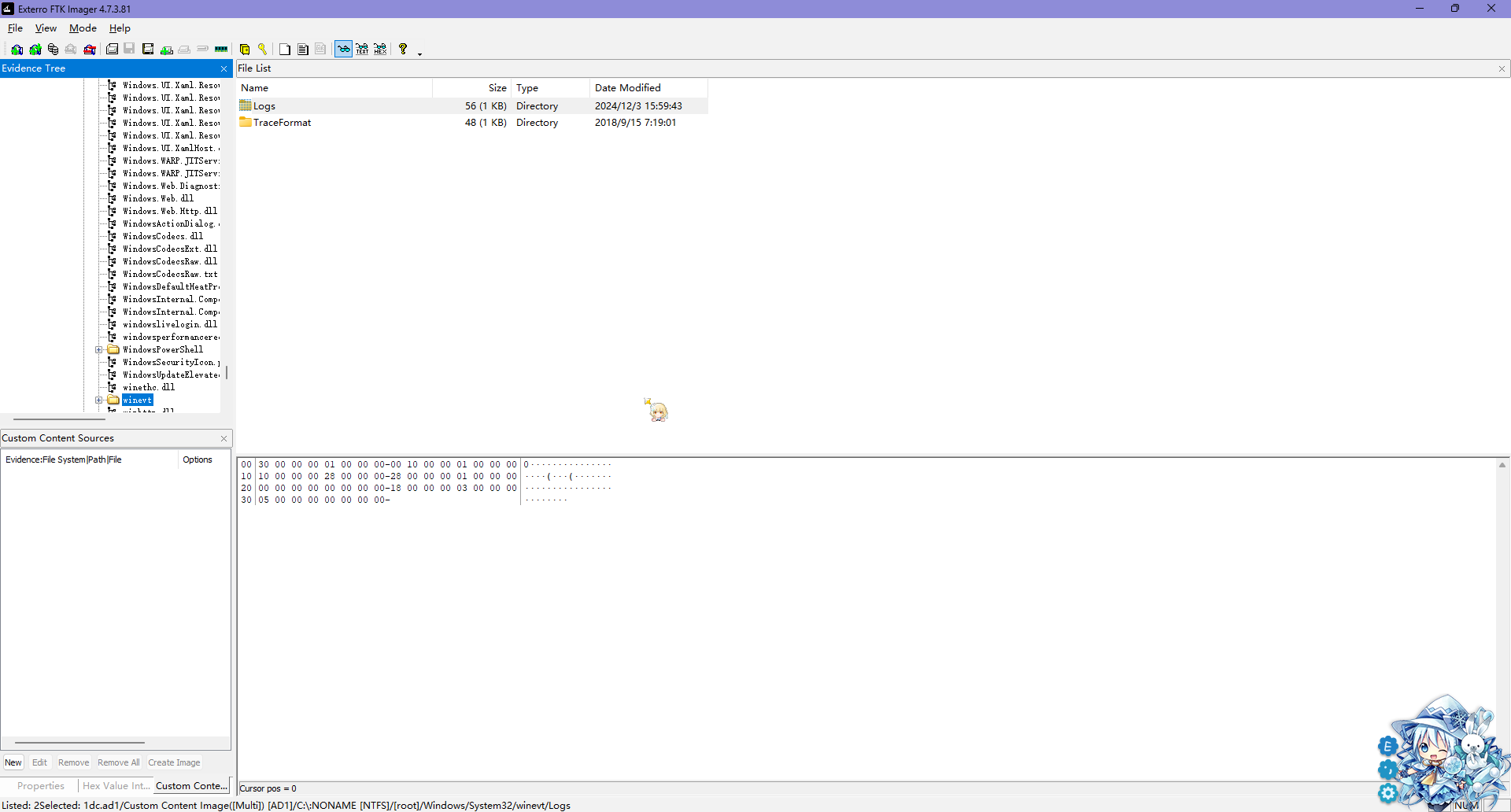
导出后,在里面可以发现 Microsoft-Windows-Windows Defender%4Operational.evtx,得知电脑使用的是 Windows Defender 作为杀软
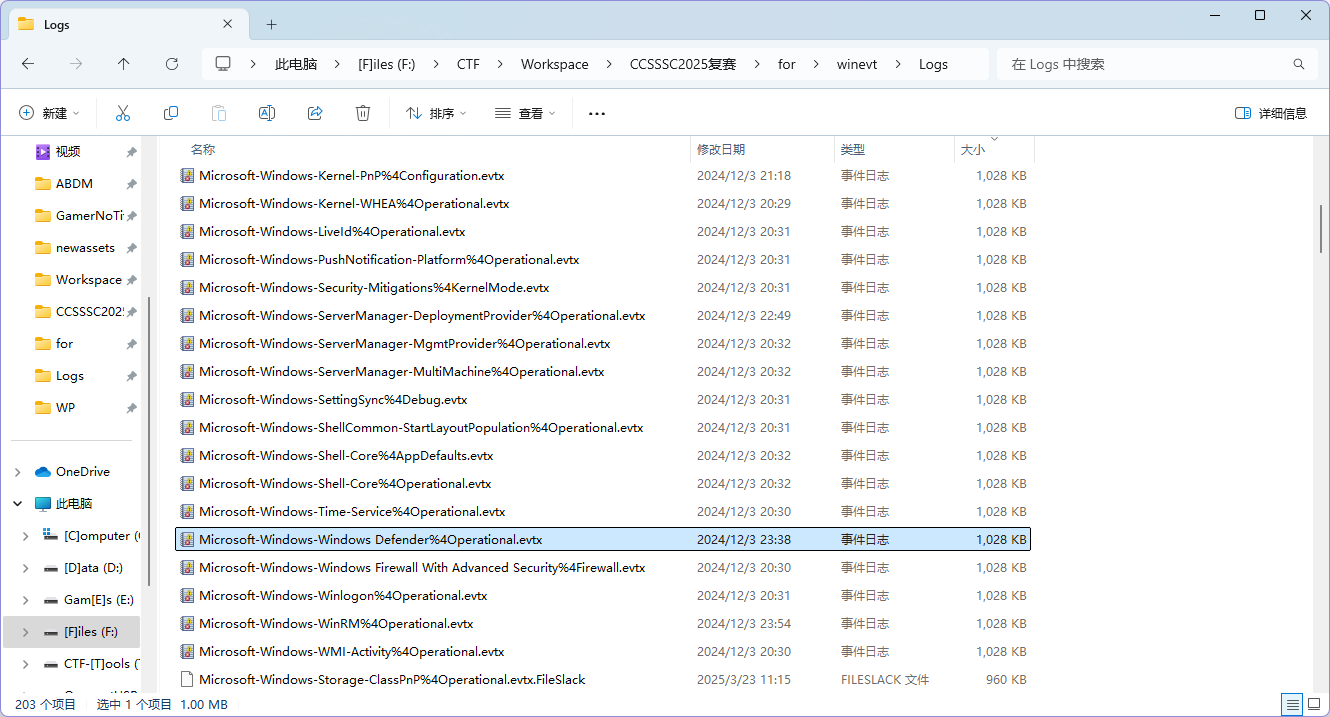
打开这个事件日志后,在第二行的警告里面就能看到木马
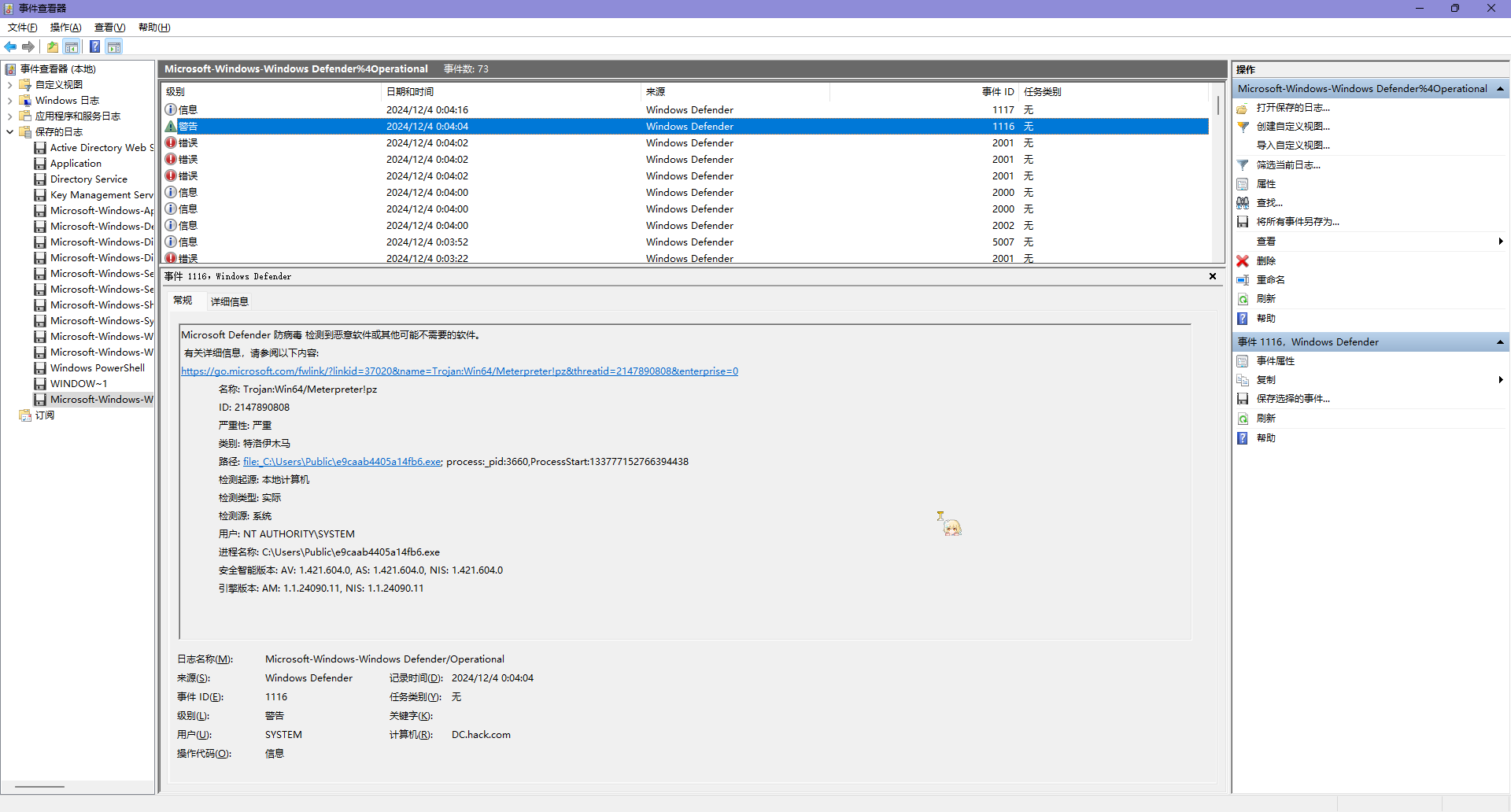
得到结果为 C:\Users\Public\e9caab4405a14fb6.exe
[MISC | AI] ez_sight | 赛后出
公司给大家发公告了…
题目提供了一个压缩包,里面有 flag.py workspace.zip 公告.txt 三个文件
公告的内容如下
各位员工:
为了提升公司的安全管理水平,从即日起,我司将引入AI技术对通行密码进行管理。相关的密码图片内容已整理并放入压缩包中,压缩包的密码将由各部门负责组织发放,请大家留意部门通知。
请注意公司内部AI模型的使用规范:1.除最后一层外与池化层外其他隐藏层输出均需要通过激活函数2.至少需要通过两次池化层3.注意隐藏之间输出数据格式的匹配,必要时对数据张量进行重塑4.为保证模型准确性,输入图片应转换为灰度图
感谢大家的配合与支持。如有疑问,请随时与人事部联系。
此致从这个文本文件我们可以知道这个题是个 AI 题,要调用它提供的模型来进行图片的辨认
{% note danger %}
笑死了这个题,我们队里有人看出来了这是压缩包明文爆破,但是但是,我们没有一个人电脑里有 bkcrack……
ZIP 文件里的内容可以用一种叫 ZipCrypto 的加密方式保护,靠密码生成一串随机字节,跟文件内容“混在一起”变成加密后的数据。它的核心是个由三个数字组成的小机器,先用密码启动,然后边加密边更新。但这方法有个弱点:如果有人知道加密后的内容和至少 12 个字节的原文,就能破解这个小机器的内部状态。掌握了状态,就能解开所有用同一密码加密的内容,还能试着猜密码,难度大概是“字符种类数 × 密码长度 - 6”。简单说,就是不够安全,容易被攻破。
压缩包明文攻击的条件
- 攻击需要至少 12 个字节的已知明文。其中至少 8 个必须是连续的。连续的已知明文越大,攻击速度越快。
{% endnote %}
解开压缩包
这个题目已经给了我们 公告.txt 文件,并且压缩包内也有这个公告,满足且远远满足于我们的条件
使用这样的命令来 crack 我们的 zip
.\bkcrack.exe -C F:\CTF\Workspace\CCSSSC2025复赛\ez_sight\workspace.zip -c 公告.txt -p F:\CTF\Workspace\CCSSSC2025复 赛\ez_sight\公告.txt这里的参数是这样的
-C F:\CTF\Workspace\CCSSSC2025复赛\ez_sight\workspace.zip表示需要 crack 的压缩包文件-c 公告.txt压缩包内的已知明文的文件-p F:\CTF\Workspace\CCSSSC2025复赛\ez_sight\公告.txt对应压缩包内已知明文文件的文件,即压缩包内的文件解压后的文件
等一会,就会给我们三个 key
bkcrack 1.7.1 - 2024-12-21[15:29:32] Z reduction using 687 bytes of known plaintext100.0 % (687 / 687)[15:29:33] Attack on 14755 Z values at index 18Keys: ffe9e9e9 d65f814a f3c468c985.3 % (12585 / 14755)Found a solution. Stopping.You may resume the attack with the option: --continue-attack 12585[15:29:45] Keysffe9e9e9 d65f814a f3c468c9通过这三个 key 我们能够生成一个使用我们自己的密码加密过后的压缩包,也就是说生成的压缩包的密码是已知的
$ .\bkcrack.exe -C F:\CTF\Workspace\CCSSSC2025复赛\ez_sight\workspace.zip -k ffe9e9e9 d65f814a f3c468c9 -U F:\CTF\Workspace\CCSSSC2025复赛\ez_sight\Unlock.zip Volcaniabkcrack 1.7.1 - 2024-12-21[15:34:06] Writing unlocked archive F:\CTF\Workspace\CCSSSC2025澶嶈禌\ez_sight\Unlock.zip with password "Volcania"100.0 % (16 / 16)Wrote unlocked archive.这里的参数是这样的
-
-C F:\CTF\Workspace\CCSSSC2025复赛\ez_sight\workspace.zip表示需要 crack 的压缩包文件(上面讲过) -
-k ffe9e9e9 d65f814a f3c468c9上面解出来的密钥,按照 bkcrack 的说明
-k, --keys <X> <Y> <Z> Internal password representation as three 32-bits integers in hexadecimal (requires -d, -D, -U, --change-keys or --bruteforce)-U F:\CTF\Workspace\CCSSSC2025复赛\ez_sight\Unlock.zip Volcania生成一个新的解锁包,这个压缩包的密码是Volcania
这个时候,再用我们自己的密码进行解压,就可以得到压缩包里面的附件了
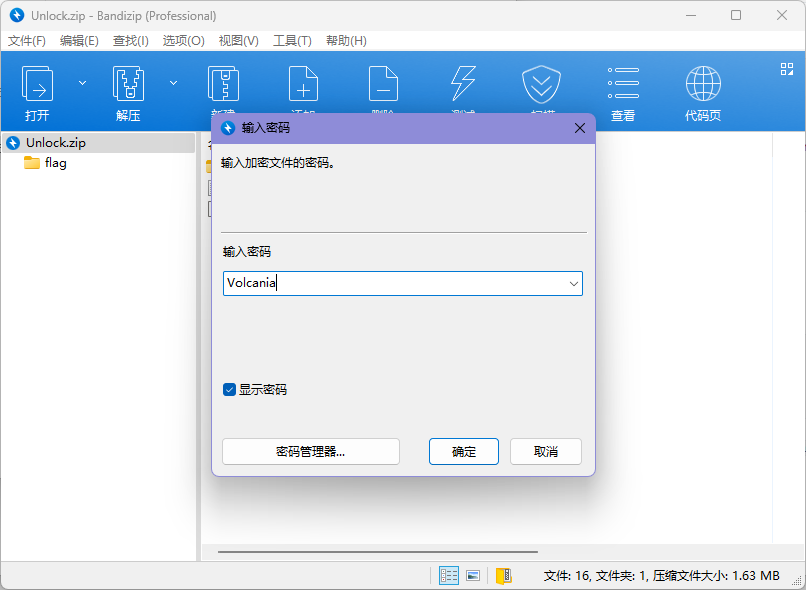
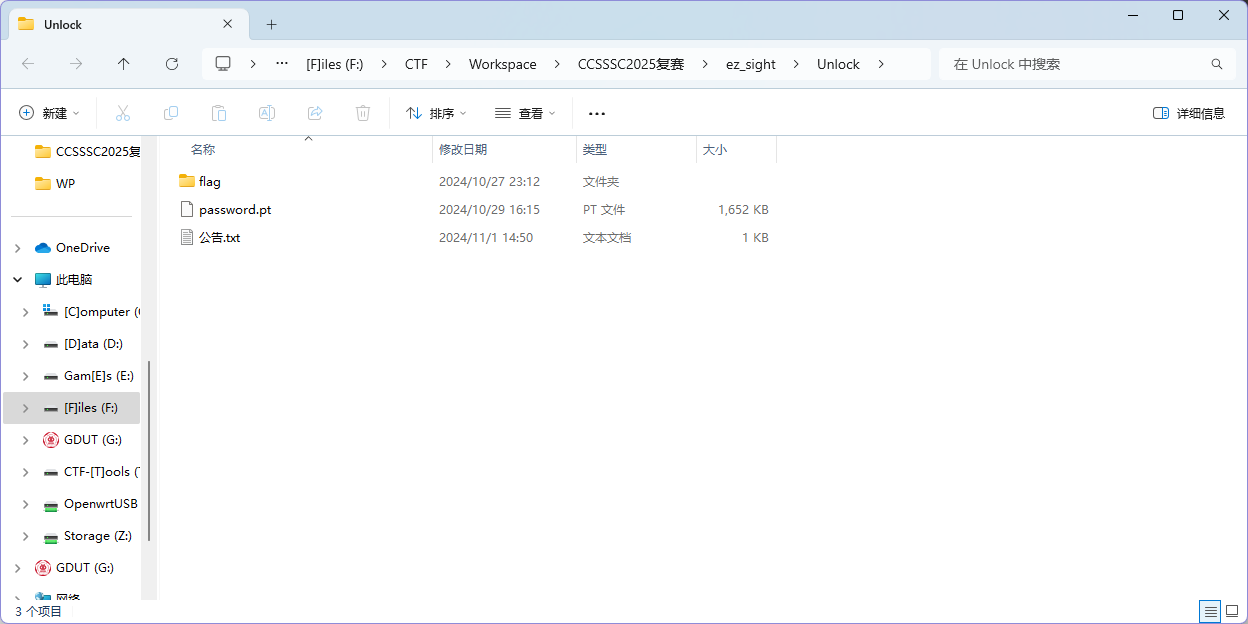
现在可以使用这个压缩包里面的文件了,按照题目的要求,我们需要加载这个模型来识别图片
踩坑环节
首先我们得知道这个模型的各种参数,我使用的是离线的 netron 进行识别的
lutzroeder/netron: Visualizer for neural network, deep learning and machine learning models
可以看到这个模型里面的各个参数,与公告是能对应上的
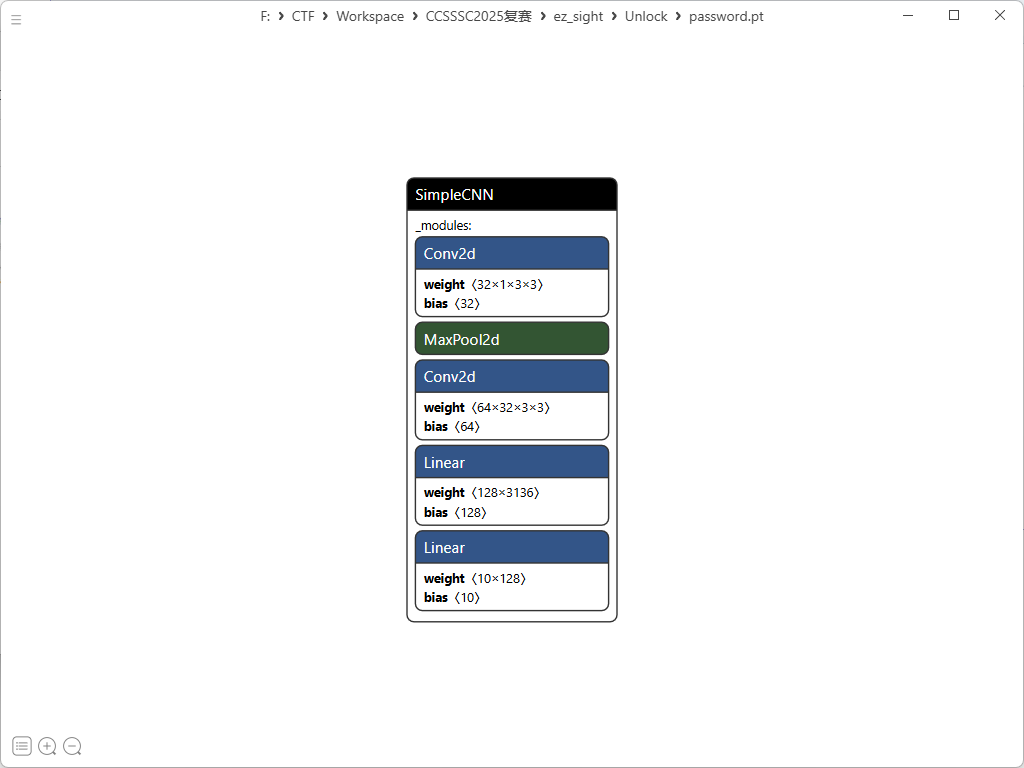
这里抄了别人的调用代码,确实没学过怎么调用模型
import torchimport torch.nn as nnimport torch.nn.functional as Fimport numpy as npfrom PIL import Imagefrom torch.serialization import safe_globalsimport os
# 根据模型实际结构定义SimpleCNN类class SimpleCNN(nn.Module): def __init__(self): super(SimpleCNN, self).__init__() # 第一层卷积层 (1 -> 32) self.conv1 = nn.Conv2d(1, 32, kernel_size=3, padding=1) # 第二层卷积层 (32 -> 64) self.conv2 = nn.Conv2d(32, 64, kernel_size=3, padding=1) # 全连接层 self.fc1 = nn.Linear(64 * 7 * 7, 128) self.fc2 = nn.Linear(128, 10)
def forward(self, x): # 第一层卷积 + 激活 + 池化 x = F.relu(self.conv1(x)) x = F.max_pool2d(x, 2) # 第二层卷积 + 激活 + 池化 x = F.relu(self.conv2(x)) x = F.max_pool2d(x, 2) # 重塑张量 x = x.view(-1, 64 * 7 * 7) # 全连接层 x = F.relu(self.fc1(x)) x = self.fc2(x) return x
# 加载模型def load_model(model_path): # 添加SimpleCNN到安全全局变量列表中 safe_globals_list = [SimpleCNN]
# 使用safe_globals上下文管理器来安全加载模型 with safe_globals(safe_globals_list): model = torch.load(model_path, weights_only=False)
model.eval() return model
# 对现有图像进行预测def predict_images(model_path, image_paths): # 加载模型 model = load_model(model_path)
results = [] for img_path in image_paths: try: # 加载图像并转换为灰度图 img = Image.open(img_path).convert('L') # 调整图像大小为28x28 img = img.resize((28, 28)) # 转换为张量 img_tensor = torch.tensor(np.array(img)).float() / 255.0 img_tensor = img_tensor.unsqueeze(0).unsqueeze(0) # 添加批次和通道维度
# 进行预测 with torch.no_grad(): output = model(img_tensor) prob = F.softmax(output, dim=1) pred_class = torch.argmax(prob, dim=1).item() confidence = prob[0][pred_class].item()
results.append({ 'image': os.path.basename(img_path), 'prediction': pred_class, 'confidence': confidence })
print(f"图像 {os.path.basename(img_path)} 预测为: {pred_class}, 置信度: {confidence:.4f}") except Exception as e: print(f"处理图像 {img_path} 时出错: {e}")
return results
# 主函数def main(): model_path = "./password.pt"
# 对已有的0-13.bmp图像进行预测 image_paths = [f"./flag/{i}.bmp" for i in range(14)] print("分析数字图像...") predictions = predict_images(model_path, image_paths)
# 打印预测结果摘要 print("\n预测结果摘要:") predicted_digits = "" for p in predictions: predicted_digits += str(p['prediction']) print(f"数字序列: {predicted_digits}")
# 尝试将数字序列转换为ASCII字符 try: ascii_text = "" for i in range(0, len(predicted_digits), 2): if i+1 < len(predicted_digits): char_code = int(predicted_digits[i:i+2]) if 32 <= char_code <= 126: # 可打印ASCII范围 ascii_text += chr(char_code) if ascii_text: print(f"可能的ASCII文本: {ascii_text}") except Exception as e: print(f"转换ASCII时出错: {e}")
if __name__ == "__main__": main()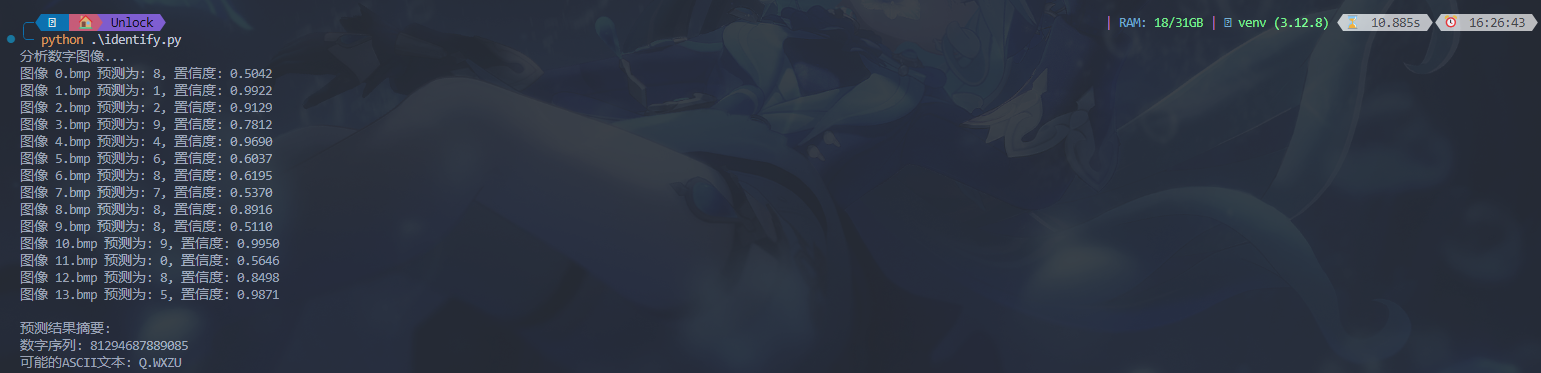
所以 flag 大概应该是 81294687889085
但是队友后来提醒我,官方给了验证的脚本
import uuidimport hashlibflag = input()# press the corrcet passwordfinal_flag = "dart{" + str(uuid.uuid3(uuid.UUID('11341600-1542-4ee8-b148-23940f18186b'),flag)) + "}"
if hashlib.sha256(final_flag.encode("utf8")).hexdigest() == "115159c751ddf16c527ee96f998ed55ed8a3302f2fd04ba60682493883901684": print("correct flag:" + final_flag)然后输了进去,发现不对
正确解法
问了一下兄弟队(他们当场就做出来了),说要挑概率大的去爆破
这里我们队的 @Jeremiah 改了一下上面搬的脚本
import torchimport torch.nn as nnimport torch.nn.functional as Fimport numpy as npfrom PIL import Imagefrom torch.serialization import safe_globalsimport os
class SimpleCNN(nn.Module): def __init__(self): super(SimpleCNN, self).__init__() self.conv1 = nn.Conv2d(1, 32, kernel_size=3, padding=1) self.conv2 = nn.Conv2d(32, 64, kernel_size=3, padding=1) self.fc1 = nn.Linear(64 * 7 * 7, 128) self.fc2 = nn.Linear(128, 10)
def forward(self, x): x = F.relu(self.conv1(x)) x = F.max_pool2d(x, 2) x = F.relu(self.conv2(x)) x = F.max_pool2d(x, 2) x = x.view(-1, 64 * 7 * 7) x = F.relu(self.fc1(x)) x = self.fc2(x) return x
def load_model(model_path): safe_globals_list = [SimpleCNN] with safe_globals(safe_globals_list): model = torch.load(model_path, weights_only=False) model.eval() return model
def predict_images(model_path, image_paths): model = load_model(model_path)
results = [] for img_path in image_paths: try: img = Image.open(img_path).convert('L') img = img.resize((28, 28)) img_tensor = torch.tensor(np.array(img)).float() / 255.0 img_tensor = img_tensor.unsqueeze(0).unsqueeze(0)
with torch.no_grad(): output = model(img_tensor) prob = F.softmax(output, dim=1) pred_class = torch.argmax(prob, dim=1).item() confidence = prob[0][pred_class].item()
# 获取所有类别的置信度 all_confidences = {str(i): prob[0][i].item() for i in range(10)}
results.append({ 'image': os.path.basename(img_path), 'prediction': pred_class, 'confidence': confidence, 'all_confidences': all_confidences # 添加所有类别的置信度 })
print(f"\n图像 {os.path.basename(img_path)} 预测结果:") print(f"预测为: {pred_class}, 最高置信度: {confidence:.4f}") print("所有类别置信度:") for cls, conf in sorted(all_confidences.items(), key=lambda x: x[1], reverse=True): print(f" 类别 {cls}: {conf:.4f}")
except Exception as e: print(f"\n处理图像 {img_path} 时出错: {e}")
return results
def main(): model_path = "./password.pt"
image_paths = [f"./flag/{i}.bmp" for i in range(14)] print("分析数字图像...") predictions = predict_images(model_path, image_paths)
print("\n预测结果摘要:") predicted_digits = "" for p in predictions: predicted_digits += str(p['prediction']) print(f"数字序列: {predicted_digits}")
try: ascii_text = "" for i in range(0, len(predicted_digits), 2): if i+1 < len(predicted_digits): char_code = int(predicted_digits[i:i+2]) if 32 <= char_code <= 126: ascii_text += chr(char_code) if ascii_text: print(f"可能的ASCII文本: {ascii_text}") except Exception as e: print(f"转换ASCII时出错: {e}")
if __name__ == "__main__": main()能够得到这样的数据
图像 0.bmp 预测结果:预测为: 8, 最高置信度: 0.5042所有类别置信度: 类别 8: 0.5042 类别 0: 0.4952 类别 9: 0.0003 类别 2: 0.0001 类别 5: 0.0001 类别 6: 0.0000 类别 3: 0.0000 类别 7: 0.0000 类别 1: 0.0000 类别 4: 0.0000
图像 1.bmp 预测结果:预测为: 1, 最高置信度: 0.9922所有类别置信度: 类别 1: 0.9922 类别 7: 0.0073 类别 4: 0.0003 类别 8: 0.0002 类别 9: 0.0000 类别 0: 0.0000 类别 5: 0.0000 类别 6: 0.0000 类别 2: 0.0000 类别 3: 0.0000
图像 2.bmp 预测结果:预测为: 2, 最高置信度: 0.9129所有类别置信度: 类别 2: 0.9129 类别 8: 0.0871 类别 1: 0.0000 类别 0: 0.0000 类别 9: 0.0000 类别 3: 0.0000 类别 6: 0.0000 类别 7: 0.0000 类别 5: 0.0000 类别 4: 0.0000
图像 3.bmp 预测结果:预测为: 9, 最高置信度: 0.7812所有类别置信度: 类别 9: 0.7812 类别 3: 0.1638 类别 5: 0.0448 类别 8: 0.0102 类别 0: 0.0000 类别 2: 0.0000 类别 6: 0.0000 类别 4: 0.0000 类别 7: 0.0000 类别 1: 0.0000
图像 4.bmp 预测结果:预测为: 4, 最高置信度: 0.9690所有类别置信度: 类别 4: 0.9690 类别 7: 0.0152 类别 1: 0.0140 类别 9: 0.0016 类别 5: 0.0002 类别 8: 0.0000 类别 3: 0.0000 类别 2: 0.0000 类别 6: 0.0000 类别 0: 0.0000
图像 5.bmp 预测结果:预测为: 6, 最高置信度: 0.6037所有类别置信度: 类别 6: 0.6037 类别 5: 0.3927 类别 8: 0.0034 类别 4: 0.0001 类别 0: 0.0000 类别 1: 0.0000 类别 9: 0.0000 类别 3: 0.0000 类别 7: 0.0000 类别 2: 0.0000
图像 6.bmp 预测结果:预测为: 8, 最高置信度: 0.6195所有类别置信度: 类别 8: 0.6195 类别 6: 0.3054 类别 5: 0.0751 类别 0: 0.0000 类别 9: 0.0000 类别 3: 0.0000 类别 1: 0.0000 类别 7: 0.0000 类别 2: 0.0000 类别 4: 0.0000
图像 7.bmp 预测结果:预测为: 7, 最高置信度: 0.5370所有类别置信度: 类别 7: 0.5370 类别 8: 0.4267 类别 1: 0.0317 类别 9: 0.0033 类别 0: 0.0010 类别 2: 0.0002 类别 3: 0.0000 类别 5: 0.0000 类别 4: 0.0000 类别 6: 0.0000
图像 8.bmp 预测结果:预测为: 8, 最高置信度: 0.8916所有类别置信度: 类别 8: 0.8916 类别 3: 0.1081 类别 5: 0.0003 类别 9: 0.0000 类别 2: 0.0000 类别 1: 0.0000 类别 6: 0.0000 类别 4: 0.0000 类别 0: 0.0000 类别 7: 0.0000
图像 9.bmp 预测结果:预测为: 8, 最高置信度: 0.5110所有类别置信度: 类别 8: 0.5110 类别 9: 0.4890 类别 4: 0.0000 类别 0: 0.0000 类别 3: 0.0000 类别 7: 0.0000 类别 2: 0.0000 类别 5: 0.0000 类别 6: 0.0000 类别 1: 0.0000
图像 10.bmp 预测结果:预测为: 9, 最高置信度: 0.9950所有类别置信度: 类别 9: 0.9950 类别 4: 0.0046 类别 7: 0.0003 类别 8: 0.0000 类别 3: 0.0000 类别 5: 0.0000 类别 2: 0.0000 类别 1: 0.0000 类别 0: 0.0000 类别 6: 0.0000
图像 11.bmp 预测结果:预测为: 0, 最高置信度: 0.5646所有类别置信度: 类别 0: 0.5646 类别 8: 0.4350 类别 6: 0.0003 类别 3: 0.0001 类别 9: 0.0000 类别 5: 0.0000 类别 2: 0.0000 类别 1: 0.0000 类别 4: 0.0000 类别 7: 0.0000
图像 12.bmp 预测结果:预测为: 8, 最高置信度: 0.8498所有类别置信度: 类别 8: 0.8498 类别 5: 0.0835 类别 2: 0.0667 类别 7: 0.0000 类别 4: 0.0000 类别 1: 0.0000 类别 6: 0.0000 类别 9: 0.0000 类别 3: 0.0000 类别 0: 0.0000
图像 13.bmp 预测结果:预测为: 5, 最高置信度: 0.9871所有类别置信度: 类别 5: 0.9871 类别 7: 0.0125 类别 2: 0.0002 类别 1: 0.0001 类别 4: 0.0001 类别 6: 0.0000 类别 3: 0.0000 类别 9: 0.0000 类别 8: 0.0000 类别 0: 0.0000也就是说,图片1~13分别可能是
candidates = [ [8, 0, 9, 2, 5], # 0.bmp: 8(0.5042), 0(0.4952) [1, 7, 4, 8], # 1.bmp: 1(0.9922) [2, 8], # 2.bmp: 2(0.9129) [9, 3, 5, 8], # 3.bmp: 9(0.7812), 3(0.1638), 5(0.0448) [4, 7, 1, 9, 5], # 4.bmp: 4(0.9690) [6, 5, 8, 4], # 5.bmp: 6(0.6037), 5(0.3927) [8, 6, 5], # 6.bmp: 8(0.6195), 6(0.3053), 5(0.0751) [7, 8, 1, 9, 0, 2], # 7.bmp: 7(0.5370), 8(0.4267) [8, 3, 5], # 8.bmp: 8(0.8916) [8, 9], # 9.bmp: 8(0.5110), 9(0.4890) [9, 4, 7], # 10.bmp: 9(0.9950) [0, 8, 6, 3], # 11.bmp: 0(0.5646), 8(0.4350) [8, 5, 2], # 12.bmp: 8(0.8498) [5] # 13.bmp: 5(0.9871)]于是写了这样的一个爆破脚本(即这个位置可能是什么东西,列举出所有的可能进行爆破求解)
import uuidimport hashlibfrom itertools import product
# 定义每个位置的候选数字(置信度>0的)candidates = [ [8, 0, 9, 2, 5], # 0.bmp: 8(0.5042), 0(0.4952) [1, 7, 4, 8], # 1.bmp: 1(0.9922) [2, 8], # 2.bmp: 2(0.9129) [9, 3, 5, 8], # 3.bmp: 9(0.7812), 3(0.1638), 5(0.0448) [4, 7, 1, 9, 5], # 4.bmp: 4(0.9690) [6, 5, 8, 4], # 5.bmp: 6(0.6037), 5(0.3927) [8, 6, 5], # 6.bmp: 8(0.6195), 6(0.3053), 5(0.0751) [7, 8, 1, 9, 0, 2], # 7.bmp: 7(0.5370), 8(0.4267) [8, 3, 5], # 8.bmp: 8(0.8916) [8, 9], # 9.bmp: 8(0.5110), 9(0.4890) [9, 4, 7], # 10.bmp: 9(0.9950) [0, 8, 6, 3], # 11.bmp: 0(0.5646), 8(0.4350) [8, 5, 2], # 12.bmp: 8(0.8498) [5] # 13.bmp: 5(0.9871)]
# 生成所有可能的组合def generate_combinations(): # 对于每个位置,按置信度从高到低排序候选数字 ordered_candidates = [] for pos in candidates: ordered_candidates.append(pos)
# 生成所有可能的组合 return product(*ordered_candidates)
# 检查flag是否正确def check_flag(flag_str): final_flag = "dart{" + str(uuid.uuid3(uuid.UUID('11341600-1542-4ee8-b148-23940f18186b'), flag_str)) + "}" if hashlib.sha256(final_flag.encode("utf8")).hexdigest() == "115159c751ddf16c527ee96f998ed55ed8a3302f2fd04ba60682493883901684": print("找到正确flag!") print("正确flag:", final_flag) return True return False
# 爆破函数def brute_force(): total = 1 for c in candidates: total *= len(c) print(f"总共有 {total} 种可能的组合")
tried = 0 for combo in generate_combinations(): tried += 1 flag_str = ''.join(map(str, combo))
# 每10000次尝试打印一次进度 if tried % 10000 == 0: print(f"已尝试 {tried}/{total} 组合, 当前尝试: {flag_str}")
if check_flag(flag_str): return
print("未找到匹配的flag")
if __name__ == "__main__": brute_force()最后得到flag
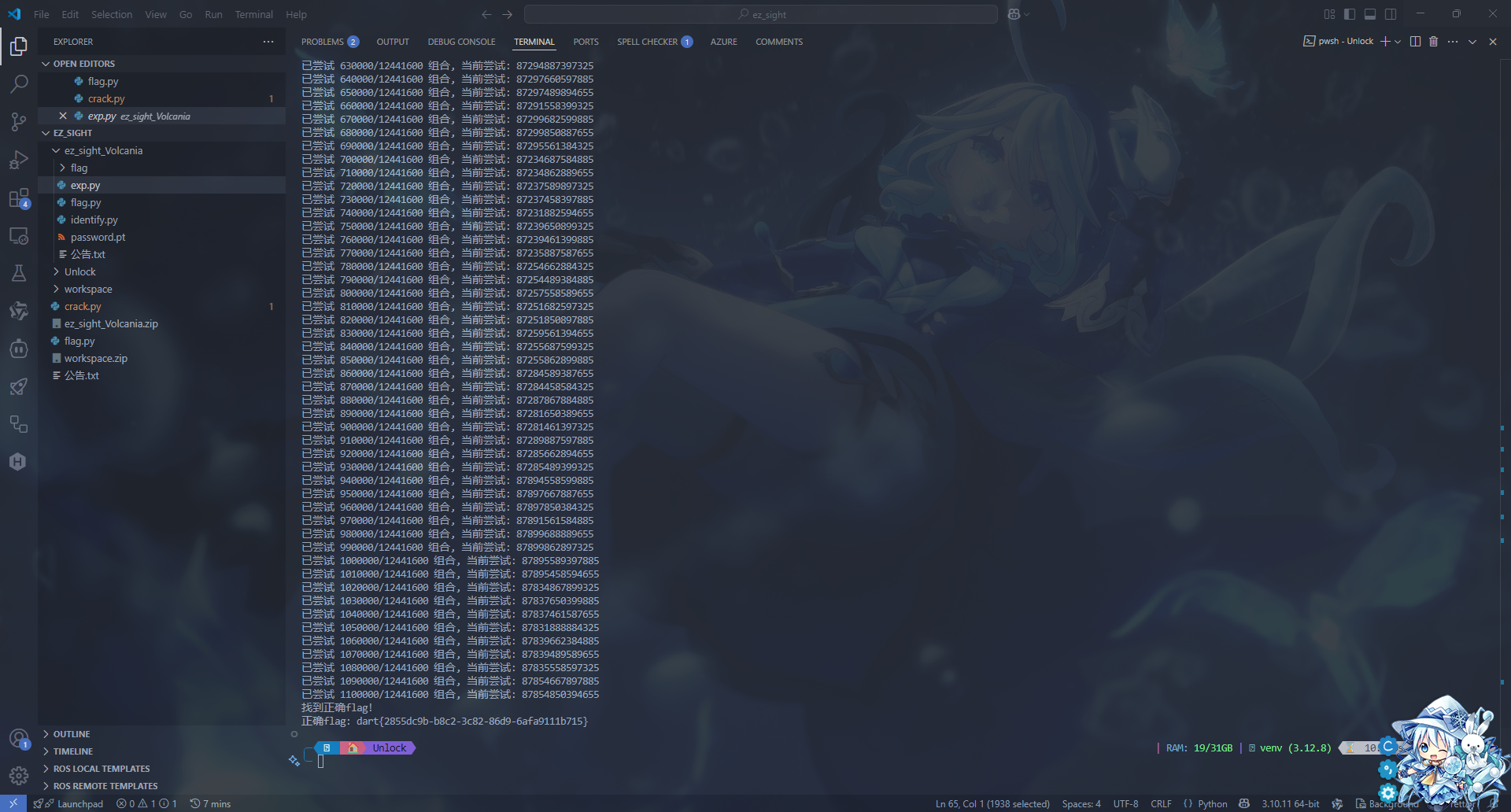
dart{2855dc9b-b8c2-3c82-86d9-6afa9111b715}
咕咕咕
剩下的有空再写
总结
这次主要还是凸显了几个不足的地方吧,首先是工具不够,本来就是线下赛没有网的我们还没有提前下好 bkcrack 这种工具;其次还是经验太少了,对于 Windows 的域渗透取证,我们还是没就接触过,虽然以前做过 Windows 的取证,但那个不是域的,所以是经验太少了。
说实话,比赛的后半程有点坐牢,因为我们在努力找取证题的答案,但是找不到,很难受
不知道到底进多少个队,据说是 19 个,如果是 19 个的话我们能进决赛,等通知了